Meet Admin Browser Tab Titles
If you spend a lot of time working in WordPress, there is a good chance your browser eventually starts looking something like this:
News ‹ Your Website — WordPress
News ‹ Your Website — WordPress
News ‹ Your Website — WordPress
News ‹ Your Website — WordPress
One tab contains new content. Another contains drafts that still need attention. A third is showing a filtered overview. Somewhere in there is probably the screen you actually wanted to work on.
Which one?
There is only one reliable way to find out: start clicking through them.
It is hardly the biggest problem you will ever encounter while working with WordPress, but when you spend hours moving between different post types, filters, dashboards and administration screens, those tiny interruptions become surprisingly annoying.
That is exactly why I created Admin Browser Tab Titles.
Give Your WordPress Admin Tabs Titles That Actually Mean Something
Admin Browser Tab Titles is a small WordPress plugin with a very straightforward purpose: it lets you decide what specific WordPress administration pages should be called in your browser tabs.
Instead of having several tabs all called something like:
Books ‹ Example Website — WordPress
you could turn them into much more useful titles such as:
- Books – New
- Books – Needs Review
- Books – Missing Information
- Books – Published
- Media Dashboard
You can then glance at your browser tabs and immediately know which screen you need.
No opening five tabs to discover that the one you wanted was tab number four all along.
Especially Handy When You Work With Different Post Types
The plugin becomes particularly useful on websites that have grown beyond the standard Posts and Pages setup.
You might have custom post types for news, reviews, games, products, books, events, locations or anything else your website requires. Within each of those post types, you may also have several different working views.
Perhaps you regularly switch between content that:
- has just been created;
- still needs editorial review;
- is missing certain information;
- belongs to a particular category or workflow;
- has a certain status;
- needs updating;
- or simply matches one of your own custom filters.
WordPress itself may still give several of those views virtually identical browser-tab titles.
Admin Browser Tab Titles allows you to give each one a name that reflects what you are actually looking at.
It is a very small change to the WordPress interface, but it can make navigating a busy backend considerably more pleasant.
It Is More Flexible Than Simply Renaming a Post Type
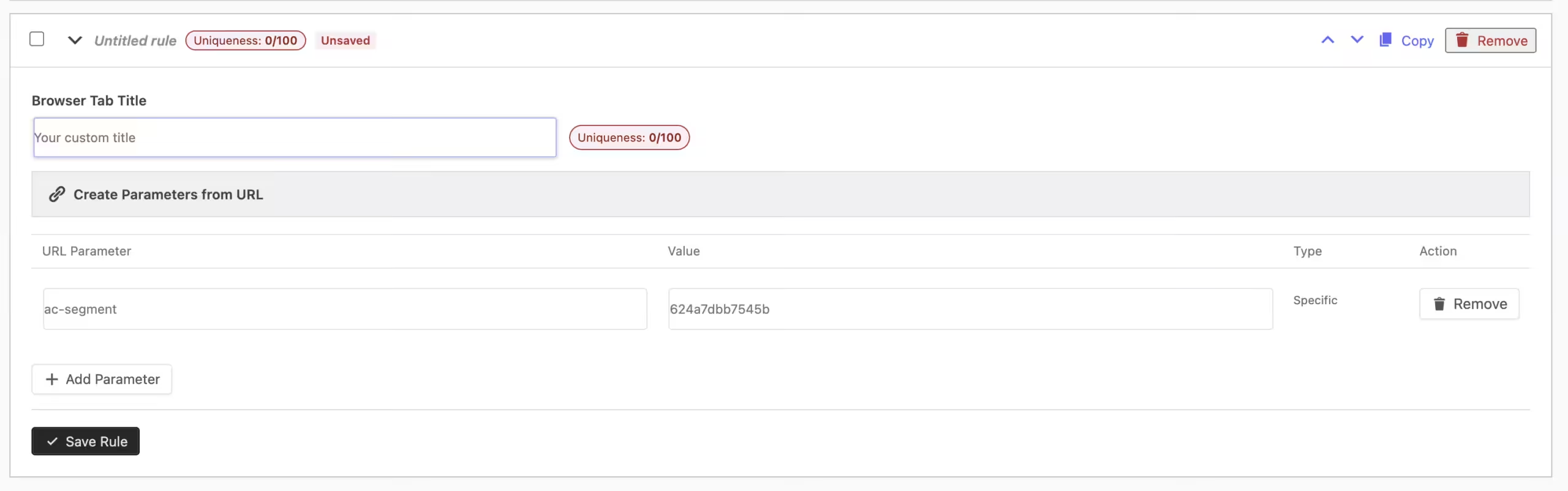
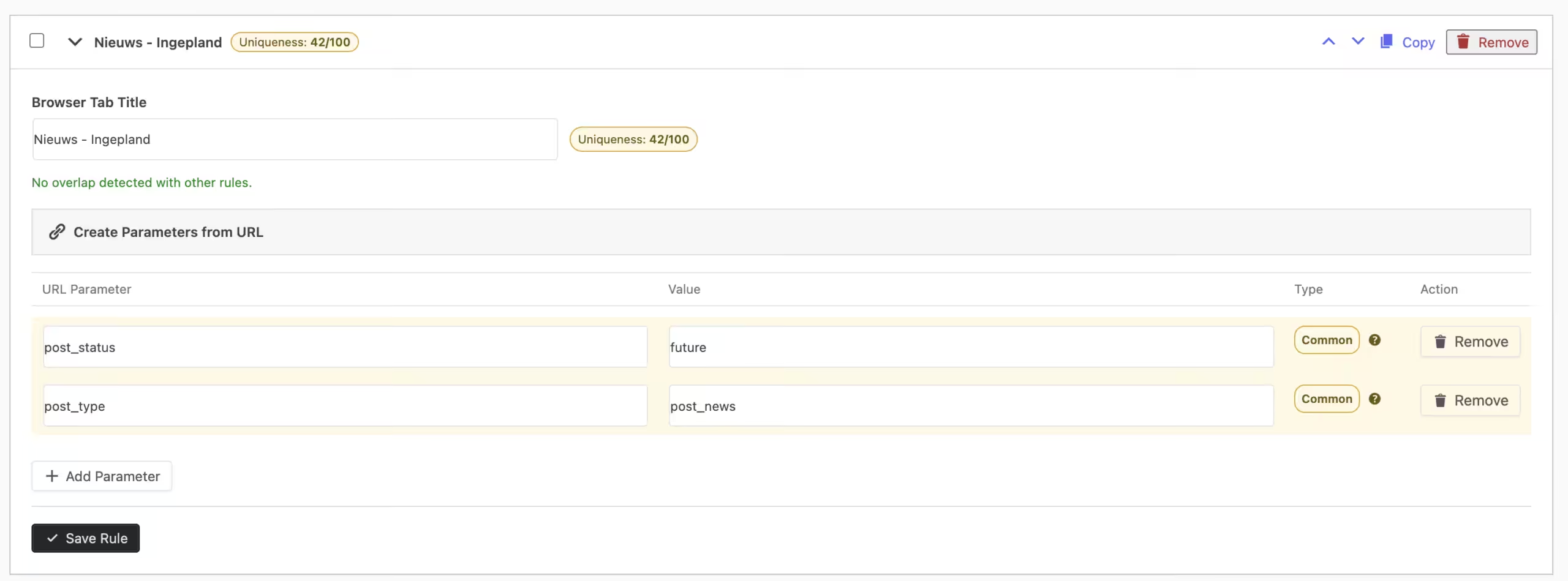
The plugin does not just look at the general WordPress page you are visiting. You can create rules based on the parameters contained in the administration URL.
For example, a WordPress admin URL might contain something like:
edit.php?post_type=books&segment=needs-review
Admin Browser Tab Titles can use information such as post_type=books and segment=needs-review to determine exactly which screen you are viewing.
You can use a single parameter when that is enough, or combine multiple parameters when you need a more precise rule.
When multiple conditions are added to a rule, they must all match before the custom browser-tab title is applied. That means you can create very specific titles without accidentally renaming every administration screen belonging to the same post type.
You Do Not Need to Enjoy Staring at WordPress URLs
While the plugin uses URL parameters to identify administration screens, you do not need to be particularly technical to configure it. Each rule includes a helper that lets you paste the complete WordPress administration URL. The plugin can then extract the relevant parameters from that URL for you.
So rather than manually figuring out which parts of a long URL you should copy, you can simply:
- Open the WordPress admin screen you want to give a better title.
- Copy its URL.
- Create a new rule in Admin Browser Tab Titles.
- Paste the URL into the parameter helper.
- Choose the browser-tab title you would prefer to see.
- Save the rule.
Refresh that administration screen and your new title should appear automatically.

It Also Helps You Create Better Rules
Once you start creating several custom titles, there is always the possibility that two rules could apply to the same administration page.
Rather than leaving you to discover that by accident later, Admin Browser Tab Titles includes tools to help you understand your rules while you create them.
The plugin can highlight parameters that are commonly used throughout the WordPress administration area. These parameters are not necessarily wrong to use, but because they occur frequently, the plugin can suggest that you combine them with something more specific.
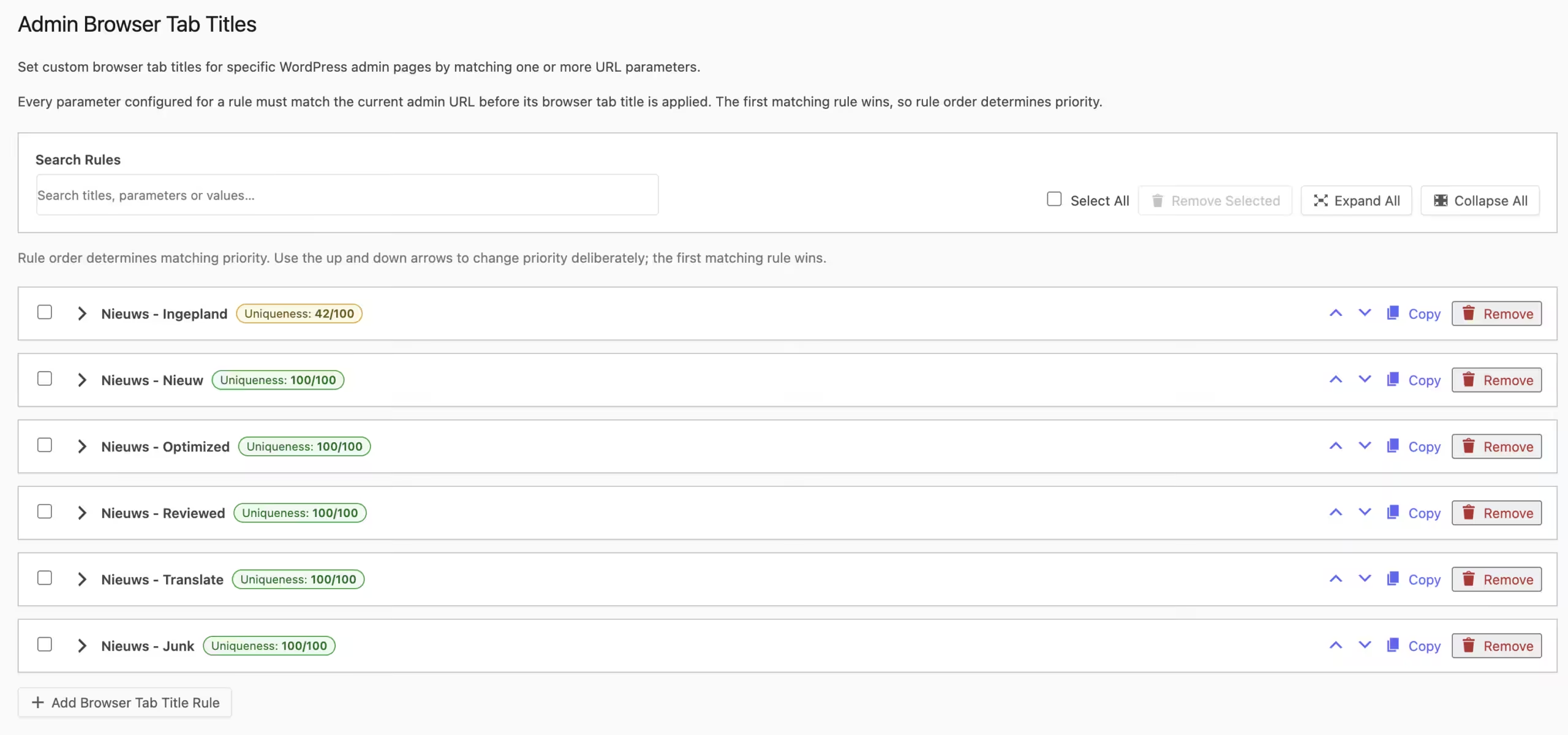
Rules also receive a uniqueness score, giving you a quick indication of how specifically a rule identifies its intended admin screen.
If two rules could overlap, the plugin can flag that as well and explain why the overlap exists. For example, one rule may simply be broader than another.
And because there are legitimate situations where multiple rules could technically match the same page, you remain in control of their priority. The first matching rule takes precedence, and you can manually move rules up or down to determine which one should win.
Useful for More Than Posts and Custom Post Types
Although custom post types were one of the main reasons I wanted this functionality myself, Admin Browser Tab Titles is not limited to content overview screens.
Many WordPress plugins create their own administration pages using URL parameters such as page=. Those screens can also be given clearer browser-tab titles when their URLs provide a suitable way to identify them.
That means you could also create recognizable tab titles for things such as:
- plugin dashboards;
- media management screens;
- custom settings pages;
- theme administration pages;
- special reporting screens;
- or other custom areas inside the WordPress backend.
If you regularly keep several of those pages open at once, being able to tell them apart directly from your browser tabs becomes surprisingly useful.
Managing Lots of Rules Does Not Have to Become Another Chore
Of course, fixing one organizational problem by creating another would not be particularly helpful.
That is why the plugin also includes several features for keeping larger collections of browser-title rules manageable.
Rules are displayed in collapsible sections so the settings page does not turn into one enormous wall of options. Individual rules can be saved separately, and existing rules can be copied when you need to create another one with a similar setup.
There is also a search function for finding existing rules, manual priority controls, and a bulk removal option for cleaning up rules you no longer need.
In other words, you can start with one or two simple custom titles and expand your setup over time without making the settings screen unnecessarily difficult to manage.
A Tiny Improvement That Makes WordPress Nicer to Work In
Admin Browser Tab Titles is not trying to reinvent WordPress.
- It does not add an enormous new workflow, change the way your content is stored or introduce something you have to think about every time you log in.
- It simply fixes one of those little things that becomes increasingly noticeable when you work in WordPress every day.
- When you have one administration tab open, the default WordPress title is perfectly fine.
- When you have eight tabs open for several post types, filtered views and plugin screens, clear titles suddenly become a lot more valuable.
Once your tabs say exactly what is behind them, navigating between different parts of your workflow becomes faster and considerably less frustrating.
And Yes, It Is Completely Free
- There is no Lite version designed to push you towards a paid version later.
- There is no Pro version hiding the useful features.
- There is no subscription.
Admin Browser Tab Titles is free. Completely free. Forever.
I created it because it solved a practical annoyance in my own WordPress workflow, and it seemed like the kind of small tool that other people working extensively in WordPress might appreciate as well.
So if your browser regularly fills up with WordPress tabs that all seem determined to look exactly the same, give it a try.
Worst case? You decide you do not need it.
Best case? You finally stop opening the same four WordPress tabs just to find out which one is which.
And considering it costs absolutely nothing, there is not much reason not to give it a go.
Learn more about Admin Browser Tab Titles:
https://patrickdankers.nl/en/plugins/admin-browser-tab-titles/