
Make your most important WordPress content easier for LLM systems to understand and access
AEO – LLMs Server gives WordPress administrators an easy way to add dynamic /llms.txt and /llms-full.txt files to their website. Instead of creating these files manually and constantly keeping them up to date, the plugin generates them automatically based on the public content you select.
You decide which posts, pages and – with Pro – other public content types are included. The plugin takes supported noindex settings from Yoast SEO and Rank Math into account, can work with WPML and creates a clear, machine-readable output designed to make important public information on your website available in a structured way.
The main advantage is simplicity. You do not need to program anything yourself, maintain Markdown files or manually update your llms.txt after every new publication. AEO – LLMs Server builds the files dynamically for you from WordPress.
The free Lite version already provides a solid foundation with support for posts and pages, automatic descriptions, WPML, caching and SEO-aware exclusions. However, if you want full control over which types of content are included, the order in which they appear, the link format used and the introduction in your files, AEO – LLMs Server Pro provides the most complete and flexible version.
Table of Contents
- Why I created AEO – LLMs Server
- What are llms.txt and llms-full.txt?
- The key features
- How does AEO – LLMs Server work?
- Lite or Pro: which version is right for you?
- Why choose Pro?
- Pricing
- Frequently Asked Questions
- Make important content easier to find within a machine-readable overview
Why I created AEO – LLMs Server
Websites have long been structured with tools such as XML sitemaps, RSS feeds, structured data and normal internal links. These techniques remain important, and AEO – LLMs Server is explicitly not intended to replace them. At the same time, new ways are emerging to make important website information available in a simple machine-readable format, including the emerging llms.txt format.
For a WordPress user, this quickly creates a practical problem. You can of course create a text file yourself, copy links, write descriptions and update the file every time the website changes. But once you publish regularly, use multiple languages or manage many pages, this quickly becomes another maintenance task.
I therefore wanted a solution that fits better with the way WordPress is used. The content already exists in WordPress. Titles, links, descriptions and publication statuses are already available. It would be unnecessary to keep maintaining the same information manually in separate files as well.
That is why I created AEO – LLMs Server: a plugin that uses WordPress itself as the source and automatically turns that content into an up-to-date /llms.txt and /llms-full.txt.
The goal is mainly to provide control without unnecessary technical complexity. You choose which public content is important enough to include, while the plugin takes care of generating, structuring and updating the files.
I also wanted to prevent the plugin from ignoring existing SEO choices. When supported settings in Yoast SEO or Rank Math indicate that certain content should not be indexed, that content can be kept out of the generated files. This allows the plugin to work alongside your existing WordPress and SEO configuration rather than separately from it.
What are llms.txt and llms-full.txt?
llms.txt is an emerging format that allows website owners to provide a simple, structured and machine-readable overview of important public content. You can think of it as an additional signpost that brings relevant pages and information together in a clear format.
AEO – LLMs Server creates two different endpoints:
/llms.txt– a more concise overview containing links to selected content and short descriptions./llms-full.txt– a more detailed version that includes longer excerpts from the selected content.
The main difference is therefore the amount of information provided. The regular llms.txt is designed to remain compact, while llms-full.txt provides more context about the included content.
It is important to understand that these files do not replace your normal website, XML sitemap, structured data, RSS feed or search engine optimization. Providing an llms.txt file also does not guarantee that an AI system will use, cite or value your website more highly. The plugin mainly gives you a practical way to make the format available on your WordPress website without having to maintain everything manually.
The key features
AEO – LLMs Server is designed to take care of the technical work behind the scenes while still giving you control over the content that appears in the files. Both Lite and Pro include the core functionality needed to provide automatic /llms.txt and /llms-full.txt endpoints, but Pro gives you significantly more freedom to tailor the final output to your website.
Automatically generated /llms.txt and /llms-full.txt
The main feature of the plugin is that you do not need to create or maintain the two files yourself. Once you have configured the plugin, WordPress generates the output dynamically whenever the relevant URL is requested.
This means you do not need to upload a physical text file through FTP or manually add links after every change. The plugin reads your saved settings, retrieves the allowed published content from WordPress and builds the machine-readable output from it.
You can then easily check the files at:
https://yourdomain.com/llms.txthttps://yourdomain.com/llms-full.txt
Decide which WordPress content is included
Not every page on a website is equally important. That is why you do not have to include everything automatically in your files.
For each available content type, you can specify how many items should be included. For example, you can choose a limited number of recent posts or include all available pages. You can also select specific items when you want full control over which publications are included.
When you select specific items, those selections take priority over the configured number. This is useful when, for example, you only want to include a number of important landing pages, information pages or high-value publications in the file.
Lite supports the standard WordPress content types Posts and Pages. Pro extends this to all public custom post types available on your website.
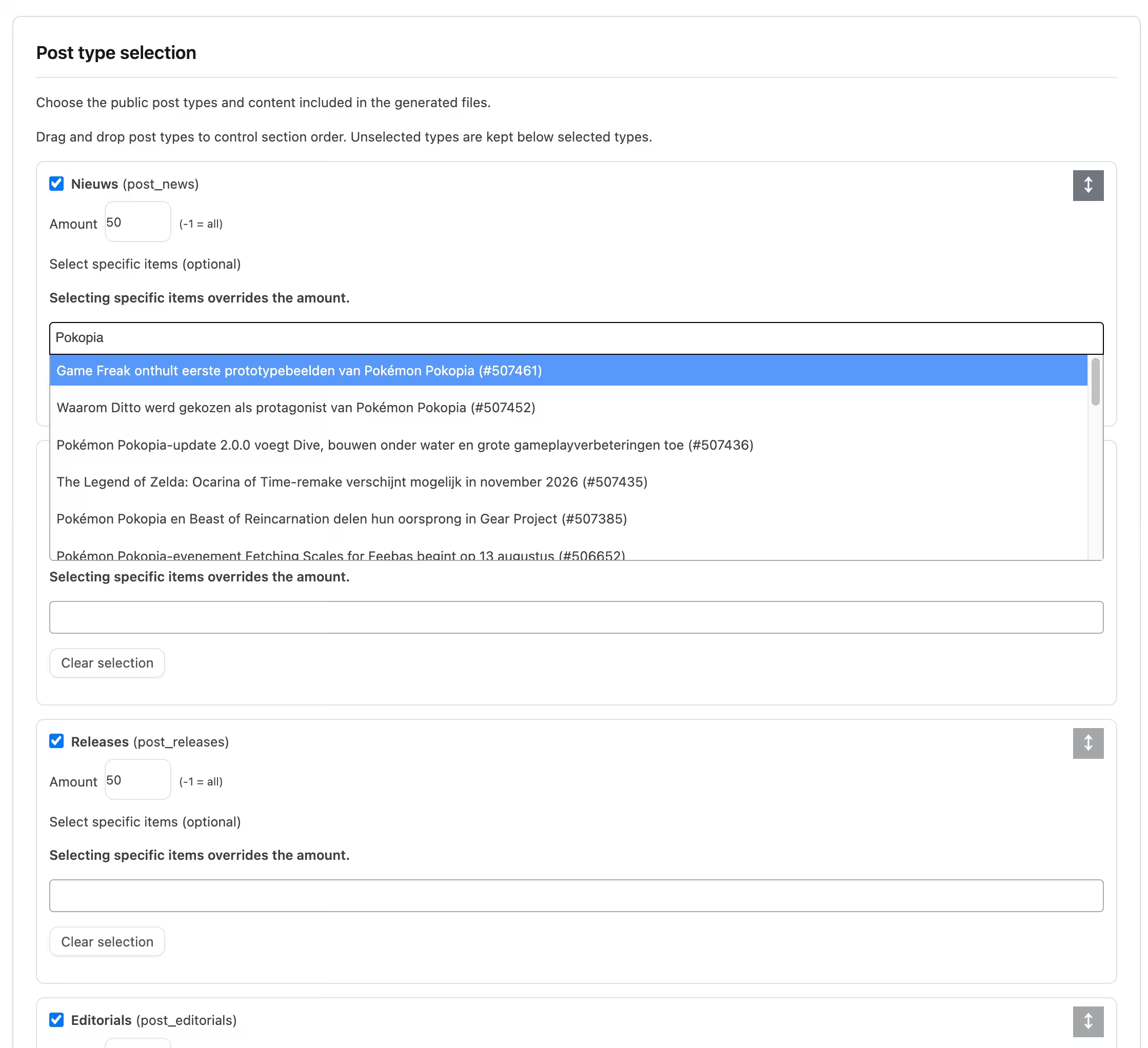
Pro supports public custom post types
Many WordPress websites contain more than just posts and pages. WooCommerce, for example, adds products, while other plugins and themes can add content types for events, portfolios, accommodation, reviews, jobs, courses and other information.
With AEO – LLMs Server Pro, these public custom post types can also be selected for the generated files.
This makes Pro much better suited to websites where important information is stored outside standard WordPress posts and pages. Instead of only showing a general part of your website, you can make the machine-readable overview better reflect the actual structure of your website.
Select specific content instead of including everything automatically
More content does not automatically mean better content. Sometimes it makes more sense to provide a carefully selected collection of important pages rather than include every publication on your website.
AEO – LLMs Server therefore lets you select specific posts or pages. You can search for the items you want and then decide exactly which ones should appear in the output.
This gives you the option to include only cornerstone content, important explanatory pages, evergreen publications or other information that is especially valuable for your website.
In Pro, this flexibility also applies to supported public custom post types.
Support for WooCommerce product categories in Pro
When a public Product content type is available and WooCommerce product categories are present, Pro can use selected product categories to determine which products are included.
This is particularly useful for larger online stores. Instead of placing every product in your machine-readable overview without distinction, you can better align the selection with the categories that are relevant to your needs.
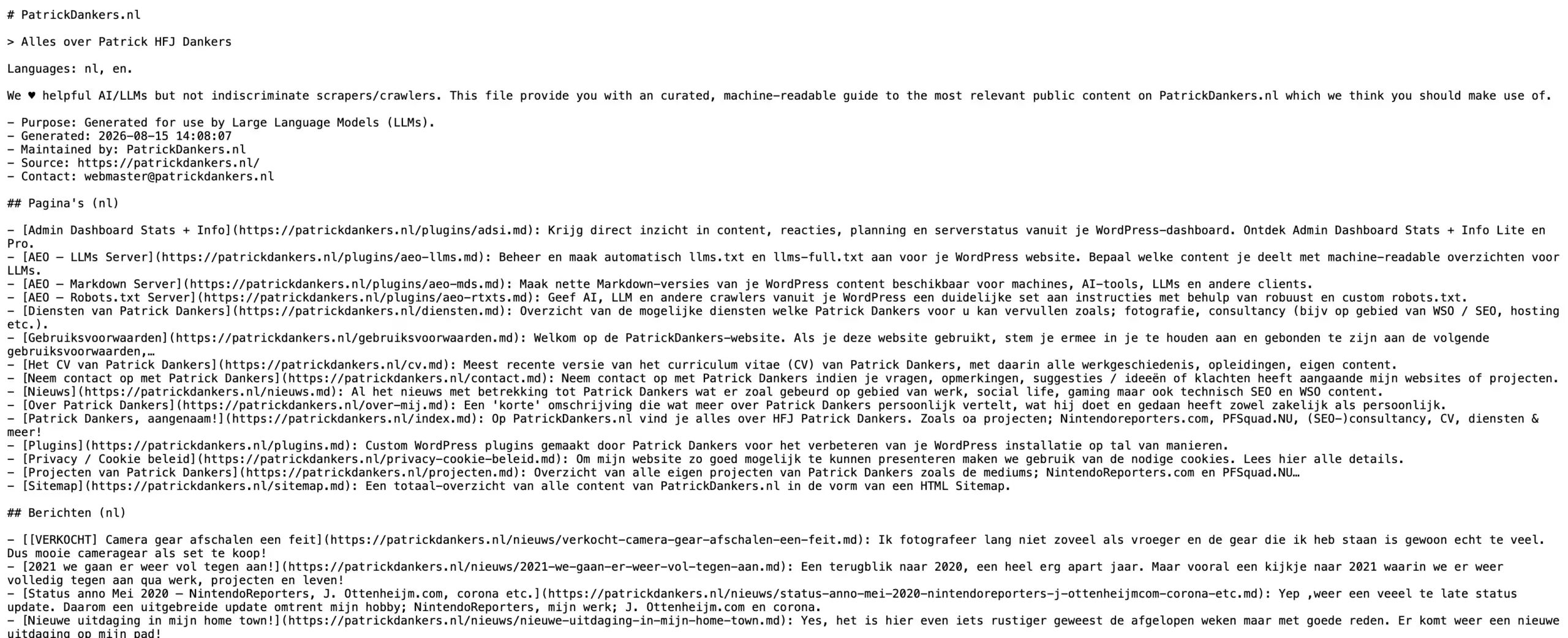
SEO-aware short descriptions for /llms.txt
A list containing only titles and links provides very little context. That is why the concise /llms.txt adds short descriptions to selected content.
When suitable SEO information is available, the plugin uses a fixed order of preference. It first checks for a suitable description from Rank Math, followed by Yoast SEO, and then the manually entered WordPress excerpt.
These concise descriptions are limited to a maximum of 40 words. When a description is shortened, or does not contain clear closing punctuation, the plugin can add an ellipsis to keep the output neat.
More detailed context through /llms-full.txt
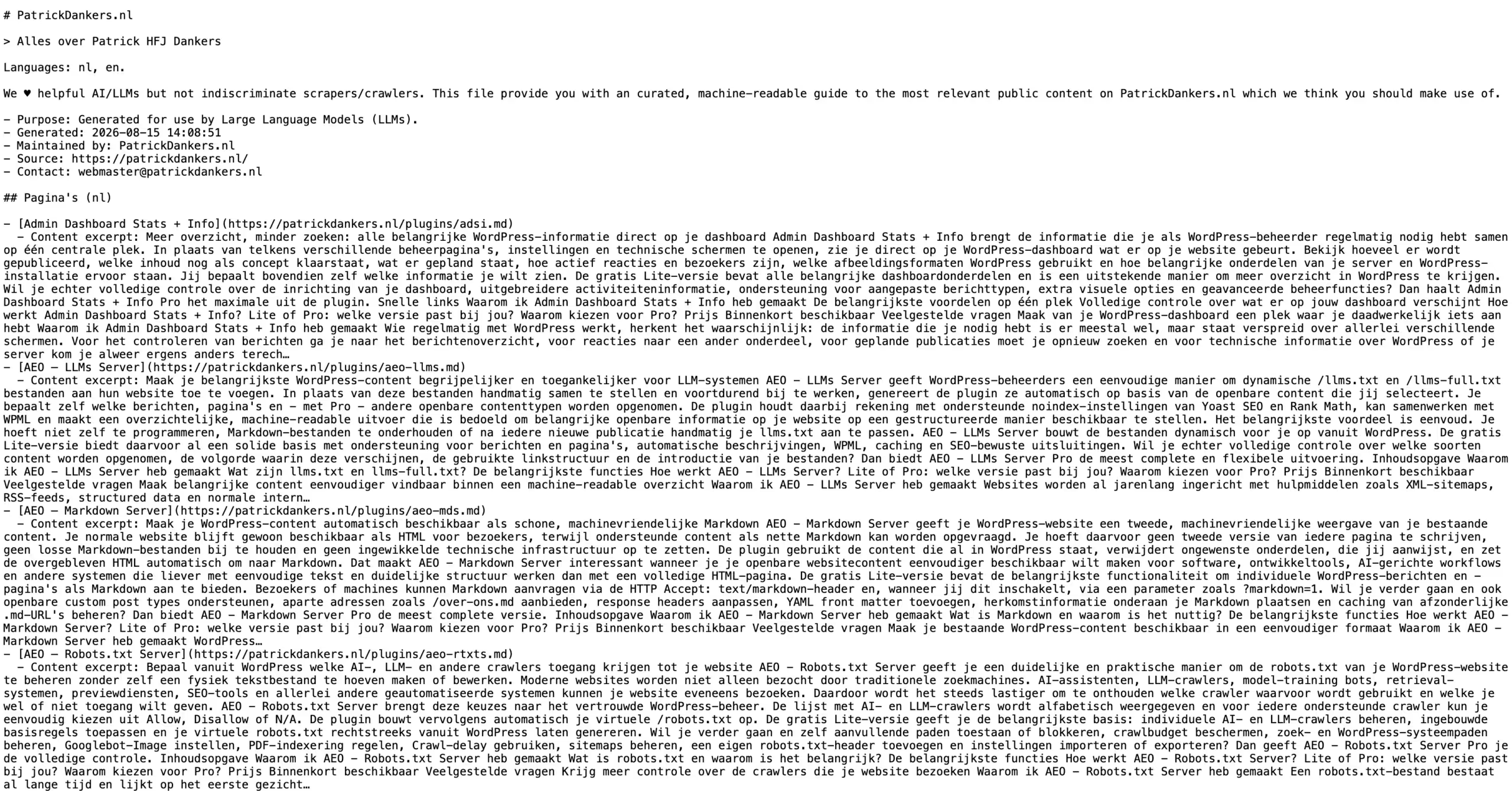
In addition to the compact file, the plugin also generates /llms-full.txt. A longer excerpt from the actual content is placed below each link.
This means the full version provides more context than a short SEO description alone. The two files can therefore exist alongside each other: one for a compact overview and one for a more detailed representation of the selected public information.
Respects supported noindex settings from Yoast SEO and Rank Math
If you have deliberately indicated that certain content should not be indexed, you do not want an additional machine-readable list to simply ignore that decision.
AEO – LLMs Server therefore checks supported noindex settings from Yoast SEO and Rank Math. Content that is considered non-indexable according to these checks is excluded from the generated files.
This helps the output remain better aligned with the existing choices you have made in your SEO plugin.
WPML support for multilingual WordPress websites
Do you use WPML to offer your website in multiple languages? AEO – LLMs Server can take the active languages into account and generate sections for them.
This means a multilingual website does not have to be treated as though all content exists in only one language. The plugin can structure the available information around the languages that are active within WPML.
This is important for international or multilingual websites because it allows the machine-readable output to better reflect the actual language structure of the website.
Decide how often the generated output is refreshed
Repeatedly collecting and processing WordPress content requires server resources. For small websites, this is usually limited, but on larger websites it can be useful to store the generated output temporarily.
That is why both Lite and Pro provide three caching options:
- Immediate – do not cache the generated output.
- Daily – refresh the generated output daily.
- Weekly – refresh the generated output weekly.
This lets you decide which balance works best for your website. A website that changes continuously can choose immediate generation, while a relatively stable website can keep the output for longer.

Add optional contact information
Both Lite and Pro include an optional contact field. If you enter something such as an email address, this information is included as contact metadata in both generated files.
The field is not required. If you do not want to add contact information, you can simply leave it empty.
Pro lets you determine the order of content sections with drag-and-drop
When multiple types of content are included, you may want to decide what appears first. Perhaps pages are more important than news posts, or maybe you want products to appear before other content.
With Pro, you can arrange the available content types in your preferred order using drag-and-drop. The selected order is then used for the sections in the generated output.
This gives you more editorial control over how your website is presented in the file without requiring you to edit Markdown or code yourself.
Pro offers three different link formats
The Lite version always uses the normal URL of your WordPress content. For many websites, that is exactly what is needed.
Pro also gives you the option to choose how links are written in both generated files:
- Normal URLs – for example
https://yourdomain.com/page/ - .md URLs – for example
https://yourdomain.com/page.md - URLs with ?markdown=1 – for example
https://yourdomain.com/page/?markdown=1
It is important to distinguish between writing a link in a certain format and actually providing a Markdown version of the relevant page. AEO – LLMs Server does not itself create Markdown versions of individual WordPress posts or pages.
If you use .md or ?markdown=1, another solution on your website must actually be able to handle those URLs. Pro therefore gives you control over the link format in the index files, but it is not an individual Markdown server for posts or pages.
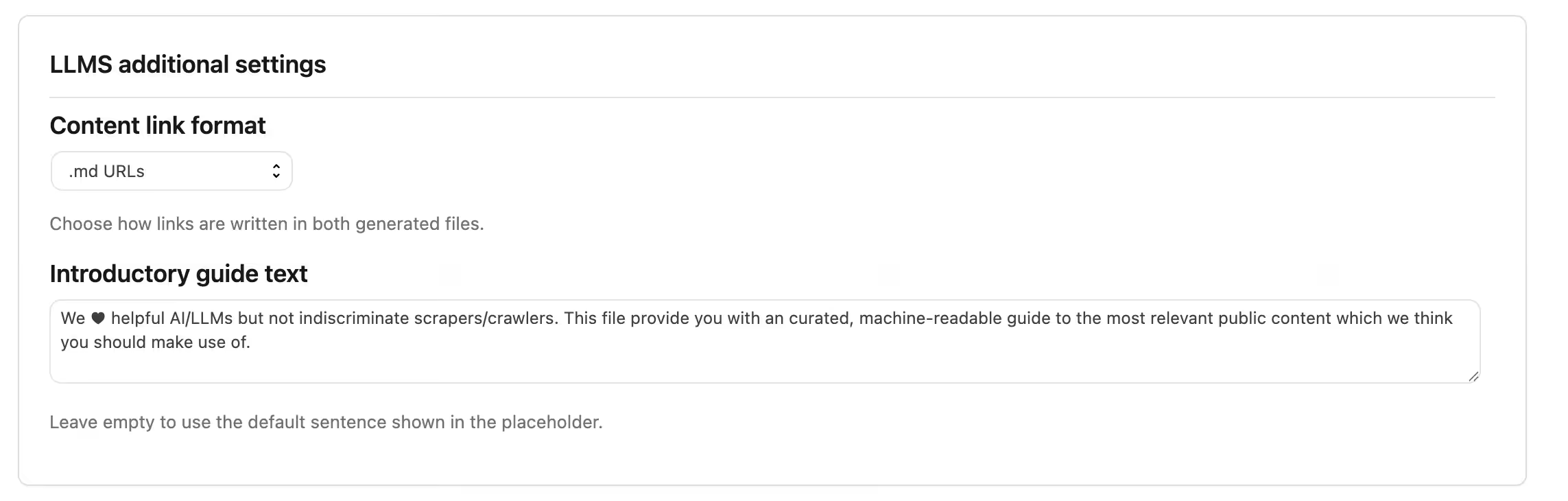
Pro lets you customize the introductory text
Both files contain an introduction explaining what the file represents. In Lite, a standard text is generated automatically using the name of your website.
With Pro, you can customize this introductory text yourself. This allows you to provide more context about your website, organization or the purpose of the selected information.
If you leave the field empty, Pro can also fall back to the standard generated introduction. You are therefore not required to write your own text, but you have the option when you want more control.
Safe cooperation between Lite and Pro
You do not need to keep Lite and Pro active at the same time. The plugins are designed to prevent conflicts between the two versions.
When Pro is activated while Lite is active, Pro takes priority and Lite is automatically deactivated. If someone tries to activate Lite while Pro is already active, Pro remains active and Lite is deactivated again.
Both versions also use compatible settings. This means supported settings can be retained when you move from Lite to Pro.
How does AEO – LLMs Server work?
Although terms such as LLM, Markdown and machine-readable may sound technical, you do not need to be a developer to use the core features of AEO – LLMs Server. The plugin is specifically designed to handle generation of the files from within the familiar WordPress environment.
- Install the plugin. Upload the ZIP through Plugins > Add New Plugin > Upload Plugin and activate AEO – LLMs Server Lite or Pro.
- Open the settings. After activation, open the AEO – LLMs Server settings. A direct link to the settings is also available on the Plugins screen.
- Choose which content types you want to include. In Lite, you can use Posts and Pages. In Pro, you can also select other public custom post types that are available on your WordPress installation.
- Decide how much content you want to show. For each available content type, you can specify how many items should be included. If preferred, you can also include all available items.
- Select specific content if needed. Do you not want to automatically include a set number of publications? You can select specific items instead. This selection takes priority over the general item count.
- Configure the additional Pro options. You can arrange content sections, choose the link format and customize the introductory text.
- Add contact information if desired. This contact information is then included as metadata in the generated files.
- Choose your caching setting. Decide whether the output should be generated immediately, daily or weekly.
- Save the settings. WordPress then uses the configuration to build the files dynamically.
- Check the endpoints. Open
/llms.txtand/llms-full.txtafter your domain name to view the generated output.
When someone requests one of these endpoints, the plugin reads your saved configuration. It then retrieves the permitted published items from WordPress. Supported noindex settings are checked, the required descriptions or excerpts are created and the result is provided as structured Markdown output.
For /llms.txt, the plugin attempts to find a short relevant description. Rank Math has first priority, followed by Yoast SEO and then the manual WordPress excerpt. For /llms-full.txt, a longer excerpt from the content itself is used.
When WPML is active, the output can also take active languages into account and create separate sections for them.
If the new endpoints do not work immediately after installation, it may be enough to go to Settings > Permalinks once and save the permalink settings again.
Lite or Pro: which version is right for you?
AEO – LLMs Server Lite is a fully usable free foundation for WordPress websites that want to provide /llms.txt and /llms-full.txt with their most important posts and pages.
AEO – LLMs Server Pro is intended for website owners who want more control over the content and structure of these files. Websites with custom post types, online stores or specific presentation requirements will benefit considerably more from Pro.
| Feature | Lite | Pro |
|---|---|---|
Dynamic /llms.txt |
Yes | Yes |
Dynamic /llms-full.txt |
Yes | Yes |
| Include WordPress posts | Yes | Yes |
| Include WordPress pages | Yes | Yes |
| Include public custom post types | No | Yes |
| Set the number of items per available content type | Yes, for Posts and Pages | Yes, for selected public content types |
| Select specific items | Yes, for Posts and Pages | Yes, for supported public content types |
| Use WooCommerce products as a public custom post type | No | Yes, if available |
| Use product categories to select products | No | Yes, if WooCommerce product categories are available |
| Drag-and-drop ordering for content sections | No | Yes |
| Normal content URLs | Yes | Yes |
.md links in generated files |
No | Yes |
?markdown=1 links in generated files |
No | Yes |
| Customize introductory text | No, standard text is used | Yes |
| SEO-aware short descriptions | Yes | Yes |
| Support for descriptions from Rank Math | Yes | Yes |
| Support for descriptions from Yoast SEO | Yes | Yes |
| WordPress excerpt as fallback | Yes | Yes |
Respect supported Yoast SEO noindex settings |
Yes | Yes |
Respect supported Rank Math noindex settings |
Yes | Yes |
| WPML support | Yes | Yes |
| Sections for active WPML languages | Yes | Yes |
| Optional contact metadata | Yes | Yes |
| Immediate generation without caching | Yes | Yes |
| Daily caching | Yes | Yes |
| Weekly caching | Yes | Yes |
| Direct settings link on the Plugins screen | Yes | Yes |
| Compatible settings when upgrading from Lite to Pro | Yes | Yes |
| Automatic Lite/Pro conflict handling | Yes | Yes |
Why choose Pro?
Lite gives you the core functionality needed to start using llms.txt and llms-full.txt at no cost. For a website that mainly consists of standard WordPress posts and pages, that may be enough.
Pro becomes especially valuable when you want more control over what you present and how you present it.
The biggest difference is support for all public custom post types. This means Pro fits modern WordPress websites much better when they use products, events, portfolio items, reviews, courses, vacancies or other specialized content types.
Pro also allows you to influence not only which types of content are included, but also how they are presented. You can change the order of the different sections using drag-and-drop, write your own introductory text and choose between normal, .md or ?markdown=1 links.
Lite is therefore an accessible free solution for a simple website. For a business website, online store, extensive publication site or another WordPress installation where you want deliberate control over the machine-readable presentation, AEO – LLMs Server Pro provides considerably more options.
Choose Lite when you want to get started easily. Choose Pro when you want to decide which important parts of your complete WordPress website are included and how the final output is structured.
Pricing
AEO – LLMs Server Lite
Free for everyone.
AEO – LLMs Server Lite will be available free of charge. It gives you the essential functionality needed to generate dynamic /llms.txt and /llms-full.txt files for your WordPress posts and pages.
Lite also supports WPML, supported noindex checks from Yoast SEO and Rank Math, automatic short descriptions, different caching frequencies, specific content selection and optional contact information.
This makes Lite a useful free edition rather than merely a temporary demonstration of Pro.
DOWNLOAD LINK; aeo-llms-pd-lite
AEO – LLMs Server Pro
Pro includes support for public custom post types, drag-and-drop section ordering, multiple link formats and customizable introductory text. AEO – LLMs Server Pro deals directly with /llms.txt, /llms-full.txt, content discovery and how a site’s information is exposed to AI/LLMs systems. My Pro edition adds custom post types, WooCommerce categories, section reordering, alternative Markdown link formats and additional control over what is presented. LLM visibility/AEO is a relatively new category and I am a bit pioneering here. This is a professional website optimisation tool, not a ‘tiny’ utility.
Pay €59 per site once instead of looking for plugins which offer the same or less at a recurring cost / higher proposition.
A special launch price of €39 lifetime per site is available for a limited time.
Lifetime license and updates included. Standard support included for 6 months.
Additional support outside of that windows will have to be discussed on a per case basis.
Purchasing options and lite and pro versions will go live in the upcoming weeks.
Frequently Asked Questions
- What exactly does AEO – LLMs Server do?
- What is an llms.txt file?
- What is the difference between llms.txt and llms-full.txt?
- Does an llms.txt file guarantee that AI systems will use or mention my website?
- Does AEO – LLMs Server replace my SEO plugin or XML sitemap?
- Do I need technical knowledge to use AEO – LLMs Server?
- Which content types can I use with Lite?
- Which additional content types does Pro support?
- Can I select specific posts and pages myself?
- Can I include WooCommerce products?
- Does AEO – LLMs Server work with WPML?
- Does the plugin work with Yoast SEO and Rank Math?
- What happens to content that is set to noindex?
- Where do the descriptions in llms.txt come from?
- Which link formats does the plugin support?
- Does Pro automatically create Markdown versions of my posts and pages?
- What does the caching setting do?
- Do I need to add contact information?
- Can I upgrade from Lite to Pro later?
- Can Lite and Pro be active at the same time?
- What happens to my website if I remove the plugin?
- What should I do if /llms.txt or /llms-full.txt does not work?
- Which WordPress and PHP versions do I need?
- What exactly does AEO – LLMs Server do?
- AEO – LLMs Server creates dynamic
/llms.txtand/llms-full.txtendpoints for your WordPress website. The plugin uses selected public WordPress content to automatically create a structured, machine-readable overview. This means you do not need to write these files manually or maintain them yourself after every change.
- AEO – LLMs Server creates dynamic
- What is an llms.txt file?
llms.txtis an emerging format that allows a website to present important public content in a relatively simple, machine-readable overview. AEO – LLMs Server automatically creates this file based on the WordPress content you select.
- What is the difference between llms.txt and llms-full.txt?
- The regular
/llms.txtis the more concise version. Selected content is displayed with links and short descriptions./llms-full.txtcontains longer excerpts from the actual content, providing more context. AEO – LLMs Server automatically generates both endpoints.
- The regular
- Does an llms.txt file guarantee that AI systems will use or mention my website?
- No. Making
llms.txtavailable does not guarantee that a search engine, Large Language Model, AI assistant or other external service will crawl, use, cite or value your content more highly. AEO – LLMs Server gives you a practical way to provide the emerging format on your website, but it cannot determine how external systems choose to use it.
- No. Making
- Does AEO – LLMs Server replace my SEO plugin or XML sitemap?
- No. The plugin is intended to complement the existing ways your website makes information available. XML sitemaps, normal crawlability, internal links, structured data, RSS feeds and your existing SEO configuration remain separate parts of your website. AEO – LLMs Server does not replace them.
- Do I need technical knowledge to use AEO – LLMs Server?
- No. You do not need to write Markdown files yourself or upload server files. After installation, you manage the main settings from WordPress. You choose which content is included, configure quantities or specific items if needed, and save your settings. The plugin then generates the endpoints for you.
- Which content types can I use with Lite?
- AEO – LLMs Server Lite supports the standard WordPress content types Posts and Pages. You can decide how many are included and can also select specific posts or pages. Other public custom post types are not enabled in Lite.
- Which additional content types does Pro support?
- Pro supports public custom post types registered by WordPress, your theme or other plugins. These can include products, events, portfolio items, reviews, courses or other specialized content types. The exact types available therefore depend on the WordPress installation on which the plugin is used.
- Can I select specific posts and pages myself?
- Yes. You can select specific content when you do not simply want to include an automatic number of items. When specific items are selected, that selection takes priority over the configured quantity for that content type. This allows you to create a deliberately curated overview of the content you consider most important.
- Can I include WooCommerce products?
- In Pro, public custom post types can be used, including the Product content type when it is available on the website. When WooCommerce product categories are present, the plugin can also use selected product categories to further limit the product selection. Lite only supports Posts and Pages.
- Does AEO – LLMs Server work with WPML?
- Yes. The plugin can recognize WPML and generate sections for active languages. This allows the machine-readable output to better reflect a WordPress website that provides content in multiple languages.
- Does the plugin work with Yoast SEO and Rank Math?
- Yes. The plugin uses supported information from these plugins in two important ways. First, SEO descriptions can be used for the short descriptions in
/llms.txt. Second, supportednoindexsettings are checked so that this type of content is not simply included in the generated files.
- Yes. The plugin uses supported information from these plugins in two important ways. First, SEO descriptions can be used for the short descriptions in
- What happens to content that is set to noindex?
- When the plugin determines through its supported Yoast SEO or Rank Math integration that a publication is set to
noindex, that publication is excluded. This helps AEO – LLMs Server keep the generated output aligned with that existing SEO decision.
- When the plugin determines through its supported Yoast SEO or Rank Math integration that a publication is set to
- Where do the descriptions in llms.txt come from?
- For the concise descriptions, the plugin uses a fixed order of preference. When suitable Rank Math information is available, it is used first. Yoast SEO comes next, followed by the manually entered WordPress excerpt. The description is limited to a maximum of 40 words so that
/llms.txtremains concise.
- For the concise descriptions, the plugin uses a fixed order of preference. When suitable Rank Math information is available, it is used first. Yoast SEO comes next, followed by the manually entered WordPress excerpt. The description is limited to a maximum of 40 words so that
- Which link formats does the plugin support?
- Lite always uses the normal WordPress URLs of the selected content. Pro can additionally write links using a
.mdformat or with the?markdown=1parameter. This setting only determines how links are written in the generated files.
- Lite always uses the normal WordPress URLs of the selected content. Pro can additionally write links using a
- Does Pro automatically create Markdown versions of my posts and pages?
- No. This is an important distinction. Pro can write
.mdor?markdown=1links in the generated index files, but AEO – LLMs Server does not itself create separate Markdown versions of your WordPress content. If you want to use these link formats, you need a separate solution that can actually provide those URLs as Markdown.
- No. This is an important distinction. Pro can write
- What does the caching setting do?
- Caching prevents the same generated output from having to be completely rebuilt for every request. You can choose Immediate, where generated output is not cached, Daily for daily caching or Weekly for weekly caching. Both Lite and Pro provide these three options.
- Do I need to add contact information?
- No. The contact field is optional. If you enter something, this information is added as Contact metadata in both generated files. If you do not want contact details to appear in the files, simply leave the field empty.
- Can I upgrade from Lite to Pro later?
- Yes. Lite and Pro use compatible settings so supported configuration can be retained when you upgrade. Pro then provides the additional options that are not available in Lite, including public custom post types, drag-and-drop ordering, customizable introductory text and additional link formats.
- Can Lite and Pro be active at the same time?
- No, this is not necessary. Pro takes priority. When Pro is activated while Lite is active, Lite is automatically deactivated. When Lite is activated while Pro is already active, Pro remains active and Lite is deactivated. WordPress also displays an administrator notice to make clear what happened.
- What happens to my website if I remove the plugin?
- Deactivating the plugin does not remove the settings. When the plugin is actually deleted through WordPress, the included uninstall process runs. Stored plugin settings and generated-output transients are removed when the other edition is not still installed. Your posts, pages, products, terms and SEO metadata are not removed by the plugin.
- What should I do if /llms.txt or /llms-full.txt does not work?
- First check that the plugin is active and the settings have been saved. If the endpoints are not available immediately after installation, go to Settings > Permalinks and save the permalink settings once again. This allows WordPress to refresh the required URL rules.
- Which WordPress and PHP versions do I need?
- The current Lite and Pro packages require at least WordPress 6.5 and PHP 8.2. In particular, check your PHP version before installing the plugin if your website is running on an older hosting environment.
Make important content easier to find within a machine-readable overview
Your WordPress website already contains the information. AEO – LLMs Server makes sure you do not also have to manually maintain a second collection of links and descriptions in order to provide llms.txt and llms-full.txt.
With Lite, you can start for free with posts and pages, automatic descriptions, WPML support, SEO-aware exclusions and configurable caching.
With Pro, you get the control that becomes important as your website grows: all public custom post types, your own section order, different link formats and an introduction that you can customize yourself.