
Automatically make your WordPress content available as clean, machine-friendly Markdown
AEO – Markdown Server gives your WordPress website a second, machine-friendly representation of your existing content. Your normal website remains available as HTML for visitors, while supported content can also be requested as clean Markdown.
You do not need to write a second version of every page, maintain separate Markdown files or set up complicated technical infrastructure. The plugin uses the content that is already stored in WordPress, removes unwanted elements that you specify and automatically converts the remaining HTML into Markdown.
This makes AEO – Markdown Server useful when you want to make your public website content more easily accessible to software, development tools, AI-focused workflows and other systems that prefer simple text and clear structure over a complete HTML page.
The free Lite version contains the most important functionality for providing individual WordPress posts and pages as Markdown. Visitors or machines can request Markdown through the HTTP Accept: text/markdown header and, when you enable it, through a parameter such as ?markdown=1.
If you want to go further and also support public custom post types, provide separate addresses such as /about-us.md, customize response headers, add YAML front matter, place provenance information at the bottom of your Markdown and manage caching for individual .md URLs, AEO – Markdown Server Pro provides the most complete version.
Table of Contents
- Why I created AEO – Markdown Server
- What is Markdown and why is it useful?
- The key features
- How does AEO – Markdown Server work?
- Lite or Pro: which version is right for you?
- Why choose Pro?
- Pricing
- Frequently Asked Questions
- Make your existing WordPress content available in a simpler format
Why I created AEO – Markdown Server
WordPress is excellent at creating and displaying websites for people. A visitor opens a page and receives a complete HTML representation with navigation, formatting, images, scripts, styles, widgets and other elements that together form the website.
For a human visitor, that is exactly what you want. However, for software that is primarily interested in the actual content of a page, the same HTML can contain far more information than necessary.
The text you have written sits among all kinds of technical elements. A menu is important to a visitor, but not always to a system that only needs the text of a specific page. The same applies to footers, scripts, navigation blocks and other elements that are part of the complete website presentation.
Markdown provides a much simpler format for this. Headings remain headings, links remain links, lists remain lists and important text structure is preserved, while much of the additional HTML surrounding the content disappears.
You could, of course, manually create Markdown versions of your WordPress pages. However, that would mean maintaining the same information in two places. If you change a WordPress page, you would also need to update the separate Markdown version. That may still be manageable for a few pages, but it quickly becomes impractical for an active website.
I therefore wanted a solution where WordPress remains the single source of truth. You write and maintain your content exactly as you always have. When a suitable client subsequently requests Markdown, AEO – Markdown Server automatically creates that Markdown representation from the same WordPress content.
I also considered it important that the normal website is not replaced. The canonical HTML page continues to exist and remains the normal page for visitors. Markdown is offered as an alternative representation when it is explicitly requested.
That is why I created AEO – Markdown Server: maintain one WordPress publication while making the same information available cleanly in multiple suitable formats.
What is Markdown and why is it useful?
Markdown is a simple text format that allows structure to be indicated without the extensive markup code of a complete HTML page.
A title can, for example, be indicated with a simple # character, links are written compactly and lists remain recognizable as clear lists. This makes Markdown relatively easy to read for both people and software.
You can think of the difference as the difference between a fully designed web page and a cleaner text version of its most important content. The web page contains everything required to visually present the website. The Markdown version focuses much more strongly on the content and structure.
AEO – Markdown Server uses the existing rendered WordPress content and converts it to Markdown. The plugin includes an HTML-to-Markdown converter and also allows you to remove certain HTML elements or supported CSS selectors before the conversion takes place.
This is useful, for example, when you know that a particular navigation block, specific container or other repeating content does not belong in the Markdown output.
Markdown does not replace your normal WordPress page, and activating this plugin does not mean human visitors will suddenly see a plain text page. Your existing HTML page remains available as usual. The Markdown version is an additional representation for clients that specifically request it.
The key features
Both Lite and Pro are built around the same principle: automatically make your existing WordPress content available as clean Markdown without having to maintain a second version of every publication.
Lite contains the core functionality needed for standard WordPress posts and pages. Pro expands this foundation with additional content types and significantly more control over how Markdown is requested, described, supplied with metadata and cached.
Serve standard WordPress posts and pages as Markdown
With AEO – Markdown Server, you can make individual WordPress posts and pages available as text/markdown.
This does not mean your existing page is replaced. When someone opens the page normally in a browser, WordPress continues to show the usual HTML version. Only when a client specifically indicates that Markdown is desired can the plugin provide the alternative Markdown representation.
In the settings, you decide whether Posts, Pages or both may be made available in this way.
The selection deliberately applies to individual publications. Overview pages, archives, search results, taxonomy archives and pagination are not automatically included in this content type selection.
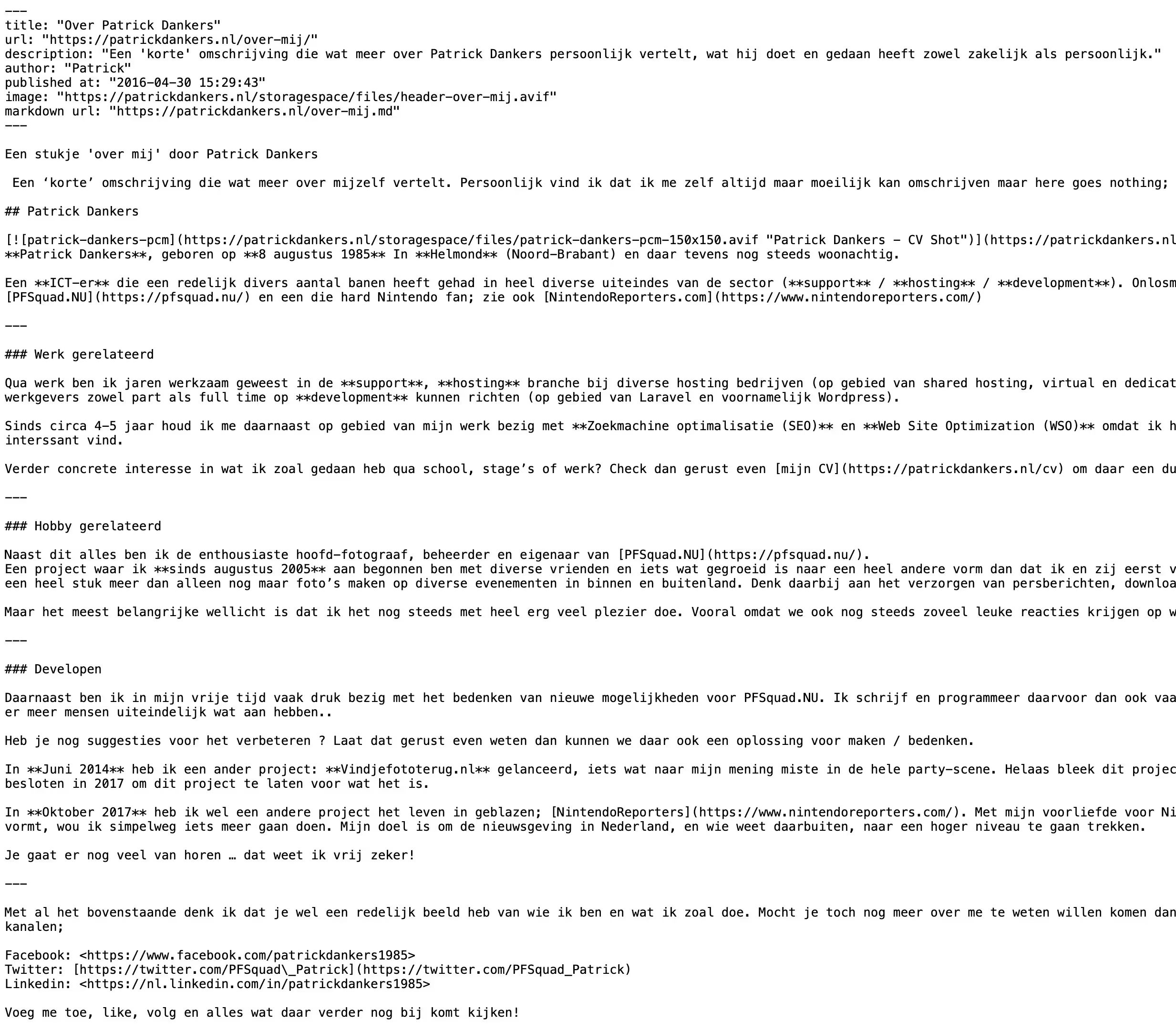
Request Markdown through the standard HTTP Accept header
One of the main ways AEO – Markdown Server works is through what is known as HTTP content negotiation.
That may sound technical, but the principle is simple. When software requests a web page, it can indicate which type of response it would prefer to receive. A client that wants Markdown can, for example, send the following information:
Accept: text/markdown
AEO – Markdown Server recognizes this request. When the relevant WordPress publication has been enabled for Markdown, the plugin can then return Markdown instead of the normal HTML representation.
The major advantage is that the normal URL of your content can remain the same. The client itself indicates which representation it wants.
Optional ?markdown=1 URL for easy explicit use
HTTP headers are useful for software, but they are not always practical when you want to quickly check a Markdown version yourself in a browser or when caching plays a role.
That is why both Lite and Pro can support an explicit Markdown GET parameter. When this option is enabled, a Markdown version can, for example, be requested through:
https://yourdomain.com/example-page/?markdown=1
Another non-zero value for the markdown parameter can also be treated as a Markdown request.
This gives you an easily recognizable way to explicitly request Markdown without having to configure a custom HTTP header yourself.
Pro adds genuine separate .md URLs
With AEO – Markdown Server Pro, you can use a third access method: a separate URL ending in .md.
A page such as:
https://yourdomain.com/about-us/
can then, for example, also be available through:
https://yourdomain.com/about-us.md
The .md address remains visible to the client. Behind the scenes, WordPress internally connects the request to the original publication and AEO – Markdown Server generates the Markdown version.
This is an important advantage of Pro when you want to provide explicit, separate and easily recognizable Markdown URLs.
Pro supports public custom post types
Lite focuses on the two standard content types used by almost every WordPress website: Posts and Pages.
However, many websites use additional content types. An online store may contain products, for example. Another website may use events, jobs, portfolio items, reviews, courses or other custom post types.
Pro allows you to select suitable public custom post types in addition to Posts and Pages.
This allows the Markdown functionality to fit much better with websites that use WordPress as a more advanced content management system and where important information is not stored only in standard posts and pages.
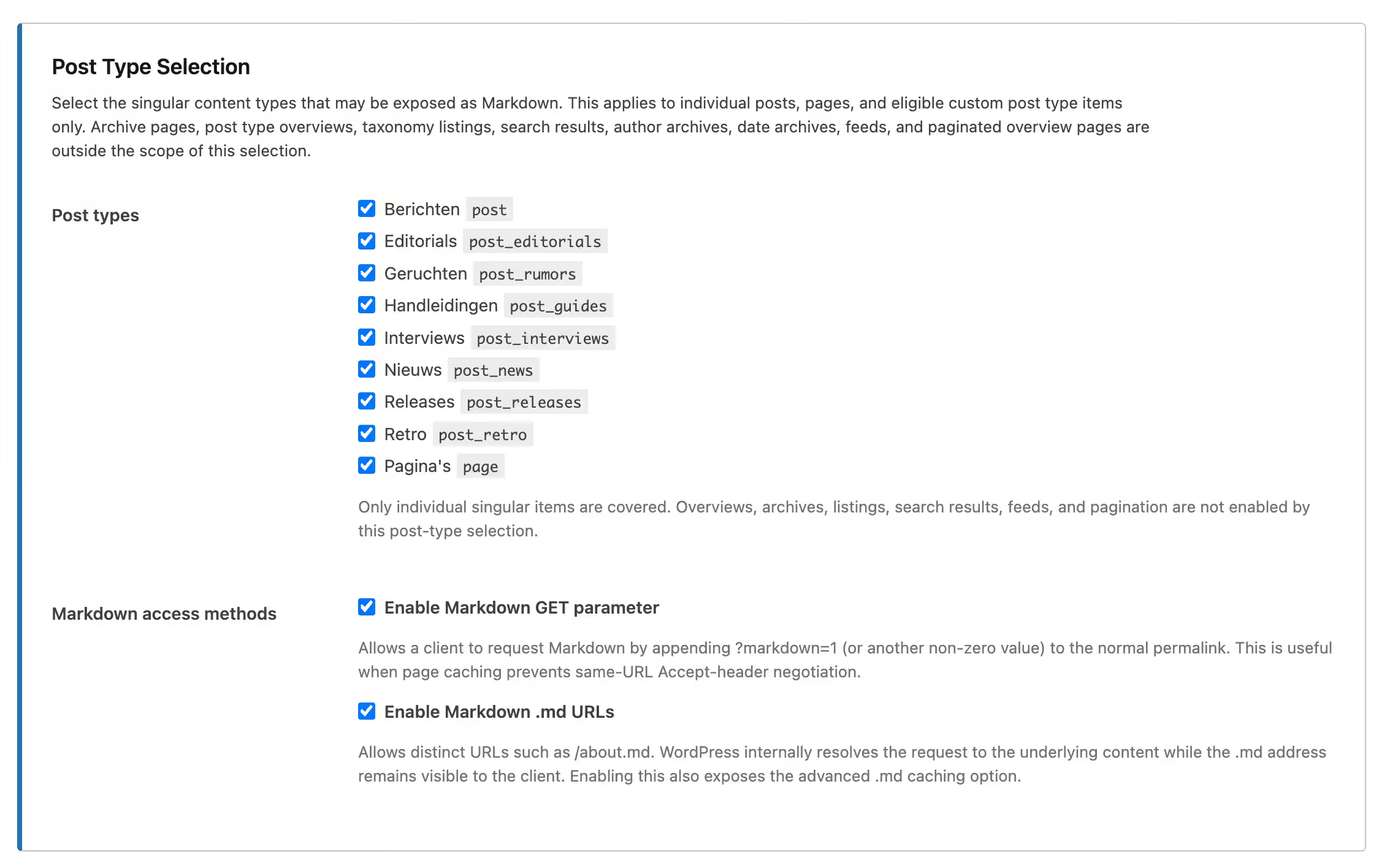
Remove unwanted HTML elements before the Markdown is created
A WordPress page can contain all kinds of additional HTML alongside the actual text. Not every part of it needs to appear in a Markdown representation.
That is why both Lite and Pro allow you to specify which HTML elements should be removed before conversion.
You can, for example, enter element names such as:
nav header footer script style aside
When these elements are present in the HTML being converted, the plugin can remove them before the remaining information is converted to Markdown.
This helps make the final output cleaner and keeps unnecessary elements out of the Markdown representation.
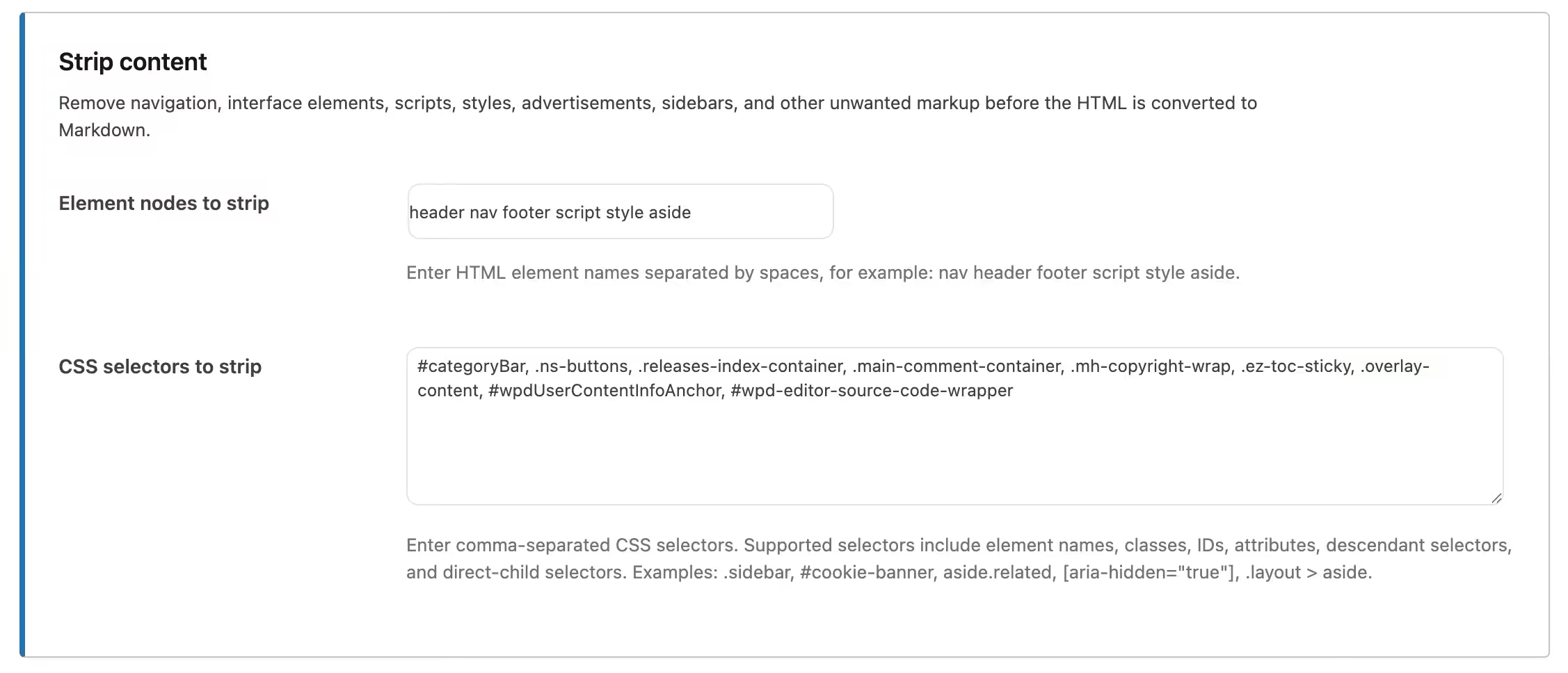
Remove specific elements with supported CSS selectors
Sometimes you do not want to remove every element of a particular type. Perhaps you only want to exclude one specific container, class or part of your page from the Markdown.
AEO – Markdown Server therefore also supports configurable CSS selectors.
The plugin supports several common selector forms, including elements, IDs, classes, attributes, descendant elements and direct children. This allows you to more precisely determine which HTML is removed before conversion.
For a non-technical user, the most important idea is simple: if a particular website element keeps appearing in the Markdown while you do not want it there, you can instruct the plugin to remove that element first.
The Markdown version refers back to the canonical HTML page
The normal WordPress page remains the original web page. The plugin therefore adds essential information that can make it clear where the Markdown output originates.
The Markdown response can, among other things, include a canonical reference to the normal HTML page and indicates that the response uses the text/markdown content type.
This prevents the Markdown from being presented as though it were a completely separate publication without a source. The relationship with the original WordPress page remains intact.
Markdown discovery helps suitable clients find the alternative version
AEO – Markdown Server can advertise Markdown alternatives so suitable software can discover that a Markdown representation is available alongside the normal HTML version.
This fits the broader principle behind the plugin: you do not need to send human visitors to another website or separate publication. The existing WordPress content remains central, while machine-friendly alternatives are made available alongside it.
A dedicated Markdown feed is included
Both Lite and Pro also provide a dedicated Markdown feed.
A feed is an automatically generated overview of recent publications. WordPress has, for example, long used feeds for RSS. AEO – Markdown Server adds a Markdown-oriented feed that allows suitable clients to discover publications within a workflow and process the associated Markdown information.
The plugin can also advertise this feed from normal WordPress pages and from the standard RSS information.
This means the Markdown functionality is useful not only at the level of an individual page, but also provides a way to discover publications as a collection.
Pro lets you customize the X-Markdown-Generator header
In addition to their content, HTTP responses can contain additional technical information in what are known as headers.
With Pro, you can optionally send the X-Markdown-Generator header. This can indicate which generator was responsible for the Markdown representation.
You can configure the value of this header yourself. This is particularly useful for developers, integrations or organizations that want to make it clear how a Markdown representation was generated.
Lite handles the essential headers normally, but this additional generator customization is exclusive to Pro.
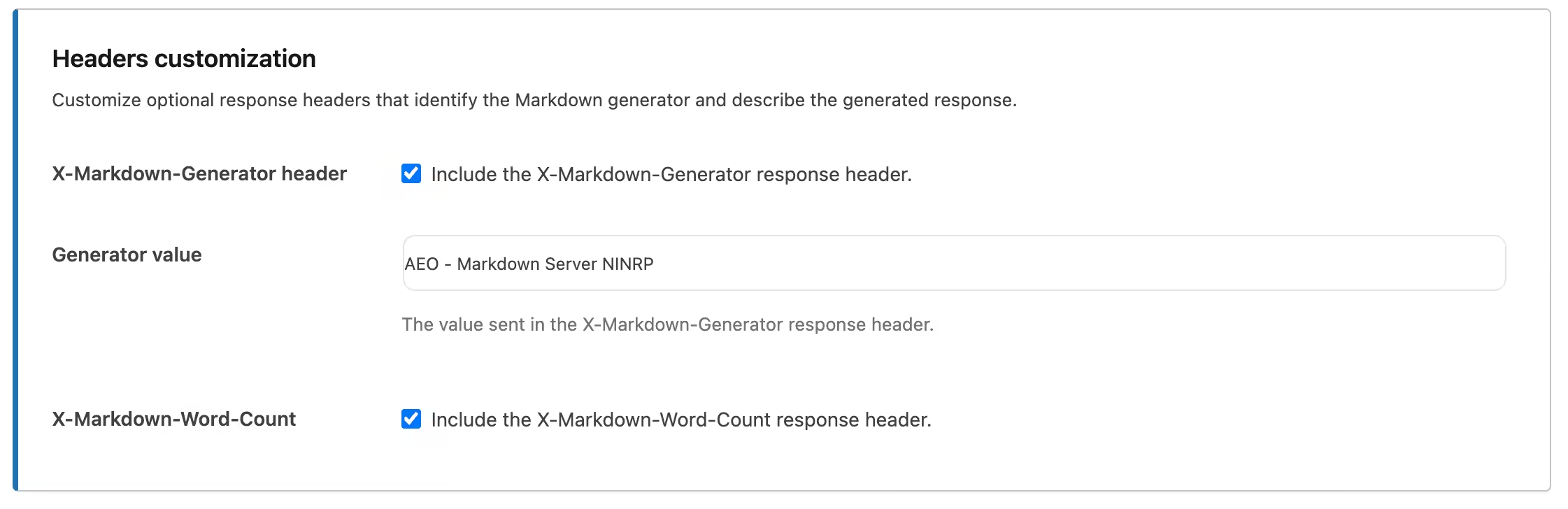
Pro can automatically include the word count of the Markdown response
Pro can also add the optional X-Markdown-Word-Count header.
This contains the number of words in the generated Markdown response. For an ordinary website visitor, this is unlikely to be important information, but software that processes Markdown may find metadata like this useful.
You decide whether this additional header is used.
Pro can add YAML front matter to every Markdown representation
One of the most powerful Pro features is support for front matter.
Front matter is a block of structured metadata at the top of a Markdown document. The normal text of the page appears underneath it.
This means a machine does not first need to infer all kinds of information from the text itself. Important metadata can be provided clearly and separately.
In Pro, the title and canonical URL are included when available. You can also enable optional fields for:
- Description
- Author
- Publication date
- Image
- Markdown URL
Empty values are not unnecessarily printed. This keeps the output as clean as possible.
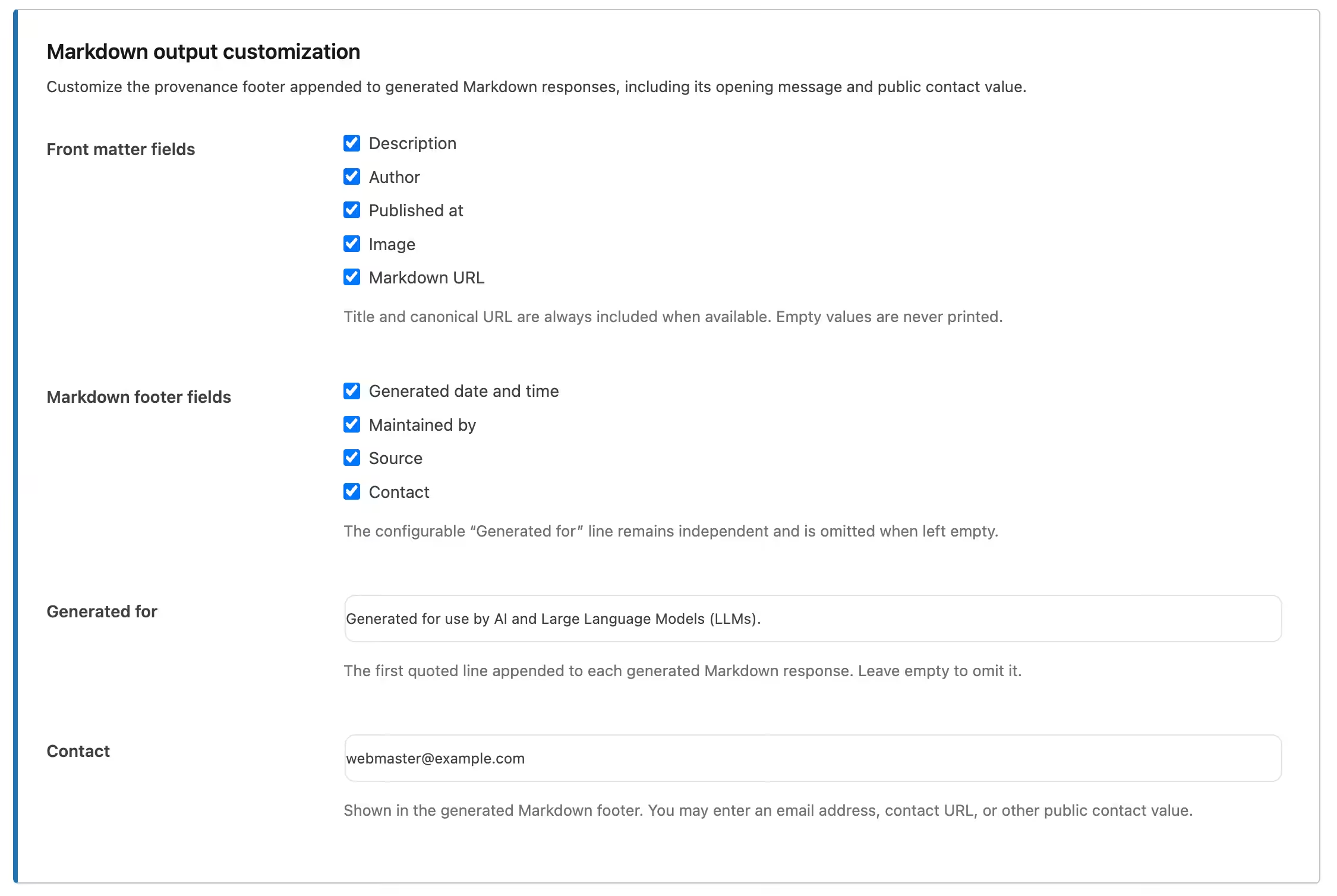
Pro can add provenance information at the bottom of the Markdown
In addition to metadata at the top, Pro can also place a configurable provenance footer at the bottom of the generated Markdown.
In this context, provenance simply means information about the origin and management of the content.
You can choose, among other things, to include:
- The date and time when the Markdown was generated
- Who maintains the content
- The source website
- Public contact information
Pro also includes a separate Generated for field. This allows you to add your own opening line to the footer. If you leave it empty, that line is not displayed.
This gives Pro significantly more options for providing generated Markdown with clear context and source information.
Pro supports optional public contact information
If you want recipients of the Markdown to be able to easily see how they can contact the website owner, you can configure a contact value in Pro.
This could, for example, be an email address, the URL of a contact page or another public contact value.
When the relevant Markdown footer field is enabled, this information can then be displayed at the bottom of the generated Markdown.
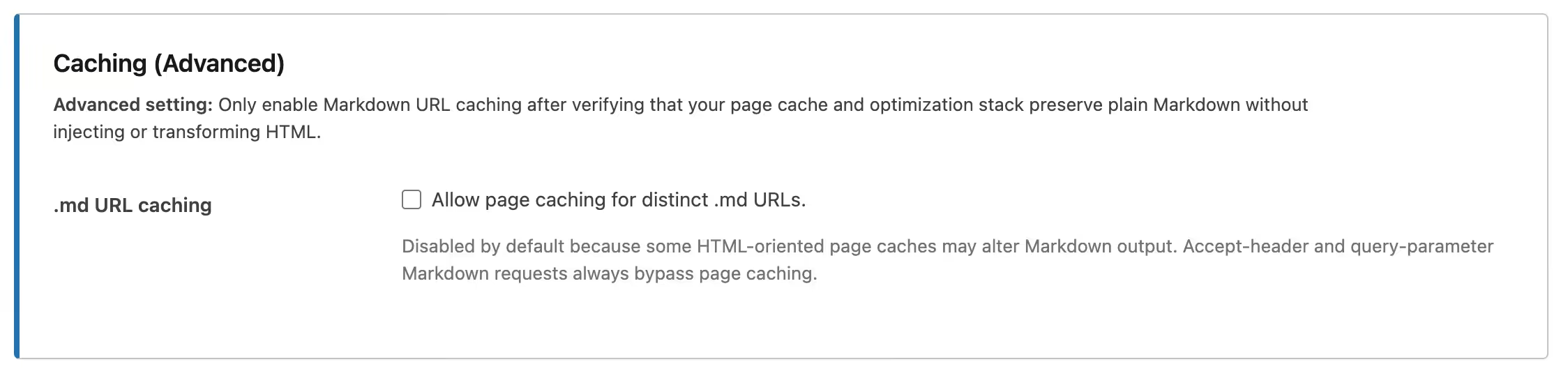
Pro gives you control over caching for separate .md URLs
Caching can make websites faster by temporarily storing a previously generated result and reusing it. However, when multiple representations of the same URL are available, caching needs to be handled carefully.
A normal HTML page and a Markdown response should not accidentally be mixed up by a page cache.
AEO – Markdown Server therefore handles Markdown requests through the same URL and the GET parameter carefully and signals to compatible page caches that these responses should not be cached as a normal HTML page.
Pro’s separate .md URLs are different. Because they have their own address, Pro can give you the option to explicitly allow page caching for them.
This setting is deliberately not enabled without consideration. Some caching and optimization solutions are strongly focused on HTML and may modify plain Markdown or inject unwanted HTML. It is therefore advisable to use this option only after confirming that your caching stack handles the Markdown correctly.
How does AEO – Markdown Server work?
The technology behind content negotiation and Markdown conversion can be quite technical, but for normal use you do not need to build or understand that technology yourself. You configure the plugin from the familiar WordPress administration environment.
- Install the plugin. In WordPress, go to Plugins > Add New Plugin > Upload Plugin, upload Lite or Pro and activate the chosen version.
- Open the settings. Go to the AEO – Markdown Server settings page.
- Choose which content may be available as Markdown. In Lite, you can select Posts and Pages. Pro adds suitable public custom post types.
- Choose the desired access methods. A suitable client can always use the supported Markdown content negotiation. You can also enable the
?markdown=1method. Pro can additionally activate separate.mdURLs. - Determine which elements should be removed before conversion. Add unwanted HTML element names or supported CSS selectors when certain elements do not belong in the Markdown.
- Configure the response headers in Pro. Optionally choose a generator header and word count.
- Configure the Markdown metadata in Pro. Select the desired front matter fields and decide which provenance information is displayed at the bottom.
- Configure contact information if desired. This can be used in the Markdown footer in Pro.
- Check the caching setting for .md URLs in Pro. Only enable caching when your caching and optimization environment processes plain Markdown correctly.
- Save the settings. From that point onward, the plugin can automatically serve suitable WordPress content as Markdown.
When a Markdown request is subsequently received, the plugin first checks whether the request relates to an allowed individual content item. The rendered WordPress HTML is then retrieved.
Any HTML elements and CSS-selected elements that you have excluded are removed. The remaining HTML is then converted by the included HTML-to-Markdown library.
In Pro, front matter can then be added, followed by the actual Markdown content and, optionally, the configurable footer.
WordPress then returns the output with the correct Markdown content type and the relevant response headers.
The normal HTML page is not removed or replaced in the process. When an ordinary visitor opens the same publication normally, the regular WordPress page remains available.
A simple practical example
Suppose you have a page at:
https://yourdomain.com/services/
An ordinary visitor opens this URL and sees your complete website with header, navigation, styling, images, footer and all the other elements.
A software client can request the same URL with:
Accept: text/markdown
AEO – Markdown Server can then return a clean Markdown representation of the permitted content.
If you have enabled the GET parameter, you can request the same representation through, for example:
https://yourdomain.com/services/?markdown=1
If you use Pro and have enabled separate Markdown URLs, the following address can also be available:
https://yourdomain.com/services.md
Meanwhile, you only maintain one actual WordPress page. The different representations are automatically generated from it.
Lite or Pro: which version is right for you?
AEO – Markdown Server Lite is designed to make the essential Markdown server functionality available for free. For a website that mainly consists of standard WordPress posts and pages, Lite already provides a strong foundation.
AEO – Markdown Server Pro is intended for websites and administrators who want to support more content types and precisely control how Markdown is provided, described and supplied with additional metadata.
| Feature | Lite | Pro |
|---|---|---|
| Serve individual WordPress posts as Markdown | Yes | Yes |
| Serve individual WordPress pages as Markdown | Yes | Yes |
| Serve public custom post types as Markdown | No | Yes |
Request Markdown through Accept: text/markdown |
Yes | Yes |
Optional ?markdown=1 method |
Yes | Yes |
Separate .md URLs such as /about-us.md |
No | Yes |
| Remove HTML elements before conversion | Yes | Yes |
| Remove supported CSS selectors before conversion | Yes | Yes |
| Automatic HTML-to-Markdown conversion | Yes | Yes |
| Normal HTML page remains the canonical source | Yes | Yes |
| Essential Markdown response headers | Yes | Yes |
| Advertise Markdown alternatives | Yes | Yes |
| Dedicated Markdown feed | Yes | Yes |
Enable and customize X-Markdown-Generator header |
No | Yes |
X-Markdown-Word-Count header |
No | Yes |
| YAML front matter | No | Yes |
| Title and canonical URL in front matter | No | Yes, when available |
| Optional description in front matter | No | Yes |
| Optional author in front matter | No | Yes |
| Optional publication date in front matter | No | Yes |
| Optional image in front matter | No | Yes |
| Optional Markdown URL in front matter | No | Yes |
| Configurable Markdown footer | No | Yes |
| Generated date and time in footer | No | Optional |
| Maintained by in footer | No | Optional |
| Source in footer | No | Optional |
| Contact information in footer | No | Optional |
| Custom Generated for line | No | Yes |
Allow caching of separate .md URLs |
No | Yes |
| Automatic Lite/Pro conflict handling | Yes | Yes |
| Standalone plugin, other edition not required | Yes | Yes |
Why choose Pro?
Lite deliberately contains the most important functionality required to actually use Markdown serving. You therefore do not get a simple demonstration where the core functionality is hidden behind a paywall. For a website with standard WordPress posts and pages, you can genuinely use Lite to make Markdown responses available.
Pro becomes particularly valuable when Markdown becomes a serious part of the way your website provides content to machines and external applications.
The first major difference is support for public custom post types. If you use WooCommerce, an event system, a portfolio, a jobs plugin, a course platform or another solution that adds its own public content types, you can also make these available in Pro.
The second major difference is the separate .md URL. Instead of using only content negotiation or a query parameter, you can provide a clearly independent Markdown address such as /page.md.
On top of that, you gain control over technical and descriptive metadata. You can provide generator information, specify the word count, compose front matter and clearly indicate at the bottom of the Markdown when it was generated, who maintains the content, where the source is located and how contact can be made.
For websites that only want to provide Markdown as a convenient alternative representation of ordinary posts and pages, Lite is an excellent free starting point. For professional websites with different content types that want to deliberately structure and document their machine-friendly output, AEO – Markdown Server Pro provides significantly more options.
Lite makes your WordPress content available as Markdown. Pro gives you control over how that Markdown is provided, described, discovered and managed.
Pricing
AEO – Markdown Server Lite
Free for everyone.
AEO – Markdown Server Lite will be available free of charge and includes the core functionality of the Markdown server.
You can select WordPress posts and pages, provide Markdown through the supported Accept header, optionally use the ?markdown=1 method, remove unwanted HTML, advertise Markdown alternatives and use the dedicated Markdown feed.
Lite is therefore a functional free edition that lets you genuinely use the plugin’s primary purpose.
DOWNLOAD LINK; aeo-mds-pd-lite
AEO – Markdown Server Pro
You will get support for public custom post types, separate .md URLs, configurable response headers, YAML front matter, provenance information and footers, public contact information and advanced caching control for dedicated Markdown URLs.
The AEO – Markdown Server Pro version is a specialised tool. The people who understand why they need clean Markdown representations for AI systems, LLMs or other machine consumers are also likely to perceive substantial value in it. My Pro edition adds things such as custom post type support, dedicated .md URLs, configurable headers, YAML front matter, provenance/contact information and Markdown caching.
That moves it from a ‘simple’ format converter to something much more useful for publishers deliberately making their websites machine-readable.
Pay €49 per site once instead of looking for plugins which offer the same less at a recurring cost / higher proposition.
A special launch price of €29 lifetime per site is available for a limited time.
Lifetime license and updates included. Standard support included for 6 months.
Additional support outside of that windows will have to be discussed on a per case basis.
Purchasing options and lite and pro versions will go live in the upcoming weeks.
Frequently Asked Questions
- What exactly does AEO – Markdown Server do?
- What is Markdown?
- Does Markdown replace my normal WordPress page?
- Do I need to be technical to use the plugin?
- Which content can I provide as Markdown with Lite?
- Which additional content does Pro support?
- What does Accept: text/markdown mean?
- What does ?markdown=1 do?
- What is the advantage of a .md URL in Pro?
- Do I need to create separate Markdown files myself?
- Can I remove unwanted elements from the Markdown?
- What are CSS selectors and do I need them?
- What is the Markdown feed?
- How can clients discover that Markdown is available?
- What is front matter?
- Which front matter information can Pro add?
- What is the Markdown footer in Pro?
- What is the X-Markdown-Generator header?
- What does X-Markdown-Word-Count do?
- How does Markdown caching work?
- Does my normal WordPress URL remain the canonical page?
- Can Lite and Pro be active at the same time?
- Do I need Lite before I can install Pro?
- What happens to my settings when I remove the plugin?
- Which WordPress and PHP versions do I need?
- What exactly does AEO – Markdown Server do?
- AEO – Markdown Server can make selected individual WordPress publications available as
text/markdownalongside their normal HTML representation. The plugin uses the existing WordPress content, removes any elements you have chosen to exclude and automatically converts the remaining HTML to Markdown. Meanwhile, the normal website remains available as usual.
- AEO – Markdown Server can make selected individual WordPress publications available as
- What is Markdown?
- Markdown is a relatively simple text format that can represent structure such as headings, links, lists, quotes and emphasis without the amount of markup normally found in a complete HTML web page. This often makes the actual content easier for software to read and process.
- Does Markdown replace my normal WordPress page?
- No. The normal HTML page continues to exist and remains the standard version that human visitors see in their browser. AEO – Markdown Server adds an alternative Markdown representation for clients that explicitly request it. You therefore do not have to choose between a normal website and Markdown.
- Do I need to be technical to use the plugin?
- No. The main configuration is handled from within WordPress. You choose, for example, which content types may be offered as Markdown and which elements should be removed before conversion. Some Pro features, such as custom headers, CSS selectors and caching settings, are more technical in nature, but you do not need to use all of them to benefit from the core functionality.
- Which content can I provide as Markdown with Lite?
- Lite supports individual WordPress posts and pages. You can select Posts, Pages or both. The selection does not automatically apply to archives, overview pages, search results, taxonomy pages or pagination.
- Which additional content does Pro support?
- In addition to Posts and Pages, Pro can also use suitable public custom post types. Which custom post types you see depends on the plugins and theme used on your website. Examples can include products, events, portfolio items, jobs, courses or other public content types added by WordPress extensions.
- What does Accept: text/markdown mean?
- When software requests a page on the internet, it can use an HTTP header to indicate which type of response it wants. With
Accept: text/markdown, the client indicates that Markdown is preferred. If the relevant WordPress publication has been enabled for it, AEO – Markdown Server can then return a Markdown response.
- When software requests a page on the internet, it can use an HTTP header to indicate which type of response it wants. With
- What does ?markdown=1 do?
- When this access method is enabled, you can explicitly request Markdown by adding
?markdown=1to the normal URL. For example,https://yourdomain.com/page/?markdown=1. This can be practical when you want to check the Markdown yourself or when same-URL content negotiation is less suitable because of the website’s caching configuration.
- When this access method is enabled, you can explicitly request Markdown by adding
- What is the advantage of a .md URL in Pro?
- Pro can provide a separate and clearly recognizable address such as
/about-us.md. The client directly requests a URL specifically intended for Markdown. Behind the scenes, WordPress connects this to the original publication while the.mdaddress remains visible to the client. This also makes HTML and Markdown easier to distinguish from each other in caching and integration workflows.
- Pro can provide a separate and clearly recognizable address such as
- Do I need to create separate Markdown files myself?
- No. That is one of the main benefits of the plugin. You simply continue maintaining your content in WordPress. When Markdown is requested, AEO – Markdown Server uses the rendered WordPress content and automatically converts it. You therefore do not need to manually write the same page again as Markdown.
- Can I remove unwanted elements from the Markdown?
- Yes. Both Lite and Pro allow you to configure HTML element names and supported CSS selectors that should be removed before Markdown conversion. This can be useful when navigation, a footer, a specific block or another repeating component does not belong in the machine-friendly representation.
- What are CSS selectors and do I need them?
- A CSS selector is a way to identify a specific HTML element or group of elements on a web page, such as a particular class or ID. You do not need this feature for normal use, but it can be helpful when you want to very precisely remove a particular part from the Markdown without removing every element of the same type.
- What is the Markdown feed?
- The plugin registers a dedicated Markdown-oriented feed through which publications can be discovered. You can think of a feed as an automatically generated overview of recent content. The Markdown feed therefore provides an additional way for suitable software to find available publications and their Markdown representations.
- How can clients discover that Markdown is available?
- AEO – Markdown Server can advertise Markdown alternatives and the dedicated Markdown feed through information added by WordPress. This means a suitable client does not necessarily need to know in advance that a Markdown representation exists. The normal HTML content remains the central web page.
- What is front matter?
- Front matter is structured metadata that can be placed at the top of a Markdown document. You can think of it as a small information block about the publication before the actual text begins. Pro uses a YAML-compatible format and can therefore provide important information alongside the main content in a clear, machine-readable way.
- Which front matter information can Pro add?
- The title and canonical URL are included when available. In Pro, you can also optionally add a description, author, publication date, image and Markdown URL. Fields without a usable value are not displayed unnecessarily.
- What is the X-Markdown-Generator header?
- This is an optional HTTP response header that can be enabled in Pro. The header can indicate which generator is responsible for the Markdown response. You can configure its value yourself. Ordinary visitors do not need this information, but it can be useful for technical integrations.
- What does X-Markdown-Word-Count do?
- When you enable this Pro option, the plugin calculates the number of words in the generated Markdown and places the result in the
X-Markdown-Word-Countresponse header. External software can therefore determine the word count without having to calculate it from the full response itself.
- When you enable this Pro option, the plugin calculates the number of words in the generated Markdown and places the result in the
- How does Markdown caching work?
- Markdown negotiated through the same URL with an Accept header or requested through the query parameter must be handled carefully because HTML and Markdown could otherwise be confused by a page cache. The plugin therefore signals that these Markdown responses should not be cached as normal pages. Pro can optionally allow caching for separate
.mdURLs because they have their own URL. Only enable this after confirming that your caching and optimization solutions correctly preserve plain Markdown.
- Markdown negotiated through the same URL with an Accept header or requested through the query parameter must be handled carefully because HTML and Markdown could otherwise be confused by a page cache. The plugin therefore signals that these Markdown responses should not be cached as normal pages. Pro can optionally allow caching for separate
- Does my normal WordPress URL remain the canonical page?
- Yes. The Markdown response can refer back to the normal WordPress permalink as the canonical source. The plugin is designed to provide Markdown as an additional representation of the same publication, not to replace your existing web page.
- Can Lite and Pro be active at the same time?
- No, that is not necessary. Pro always takes priority. When Pro is activated while Lite is active, Lite is automatically deactivated. If someone tries to activate Lite while Pro is active, Lite deactivates itself again and Pro remains active.
- Do I need Lite before I can install Pro?
- No. Both editions are standalone plugins. Pro contains the full functionality and does not require Lite. You can therefore install Pro directly if you want immediate access to all features.
- What happens to my settings when I remove the plugin?
- Simply deactivating the plugin preserves the settings for the relevant edition. When you actually delete Lite through WordPress, the uninstall process removes the stored Lite settings. Deleting Pro similarly removes the Pro settings. Lite and Pro use separate database options, so deleting one edition does not automatically remove the settings of the other edition.
- Which WordPress and PHP versions do I need?
- The current Lite and Pro packages require at least WordPress 6.5 and PHP 8.2. If your website is running an older WordPress or PHP version, it must first be updated before using the plugin.
Make your existing WordPress content available in a simpler format
You do not have to choose between an attractive website for people and a cleaner representation for software. AEO – Markdown Server allows you to use the same WordPress content for both.
Your visitors continue to see your normal website. When a suitable client needs Markdown, the plugin can automatically provide a cleaner text representation of the same publication.
With Lite, you get the most important functionality for WordPress posts and pages completely free, including HTTP content negotiation, the optional Markdown parameter, content stripping, Markdown discovery and the dedicated feed.
With Pro, you expand this to public custom post types and gain the features that become important when you want full control: separate .md URLs, configurable headers, YAML front matter, provenance footers and caching management for Markdown-specific URLs.