The web is changing. Search engines are no longer the only automated systems visiting your website. AI assistants, large language model crawlers, model-training bots, retrieval systems, preview services, SEO tools and many other automated services may all request content from your WordPress website.
That makes one of the oldest files on the web increasingly relevant again: robots.txt.
The problem is that managing this file manually can quickly become cumbersome. You need to know which crawler belongs to which service, remember the correct user-agent names, decide what you actually want to allow or block and then maintain all those rules over time.
AEO – Robots.txt Server is my attempt to make that process considerably easier from within WordPress.
Manage Your Robots.txt Directly from WordPress
AEO – Robots.txt Server gives WordPress administrators a practical interface for controlling their website’s robots.txt without requiring them to manually maintain a physical text file on the server. Instead, the plugin works with WordPress’ virtual robots.txt functionality. Your configuration remains inside WordPress, while the plugin builds the rules that are served when someone or something requests /robots.txt.
This means there is no need to connect through FTP, open a hosting control panel or repeatedly edit a text file whenever you want to change your crawler policy.
More information about AEO – Robots.txt Server is available at patrickdankers.nl/en/plugins/aeo-rtxts/.
AI and LLM Crawlers Are Becoming Part of Website Management
For many years, discussions around robots.txt primarily revolved around traditional search engines. Today, the crawler landscape is considerably broader.
Website owners may encounter crawlers connected to AI assistants, LLM platforms, model training, retrieval systems and other automated services alongside familiar search engine crawlers.
Whether you want these systems to access your website is ultimately your decision. The important part is having a manageable way to express that decision.
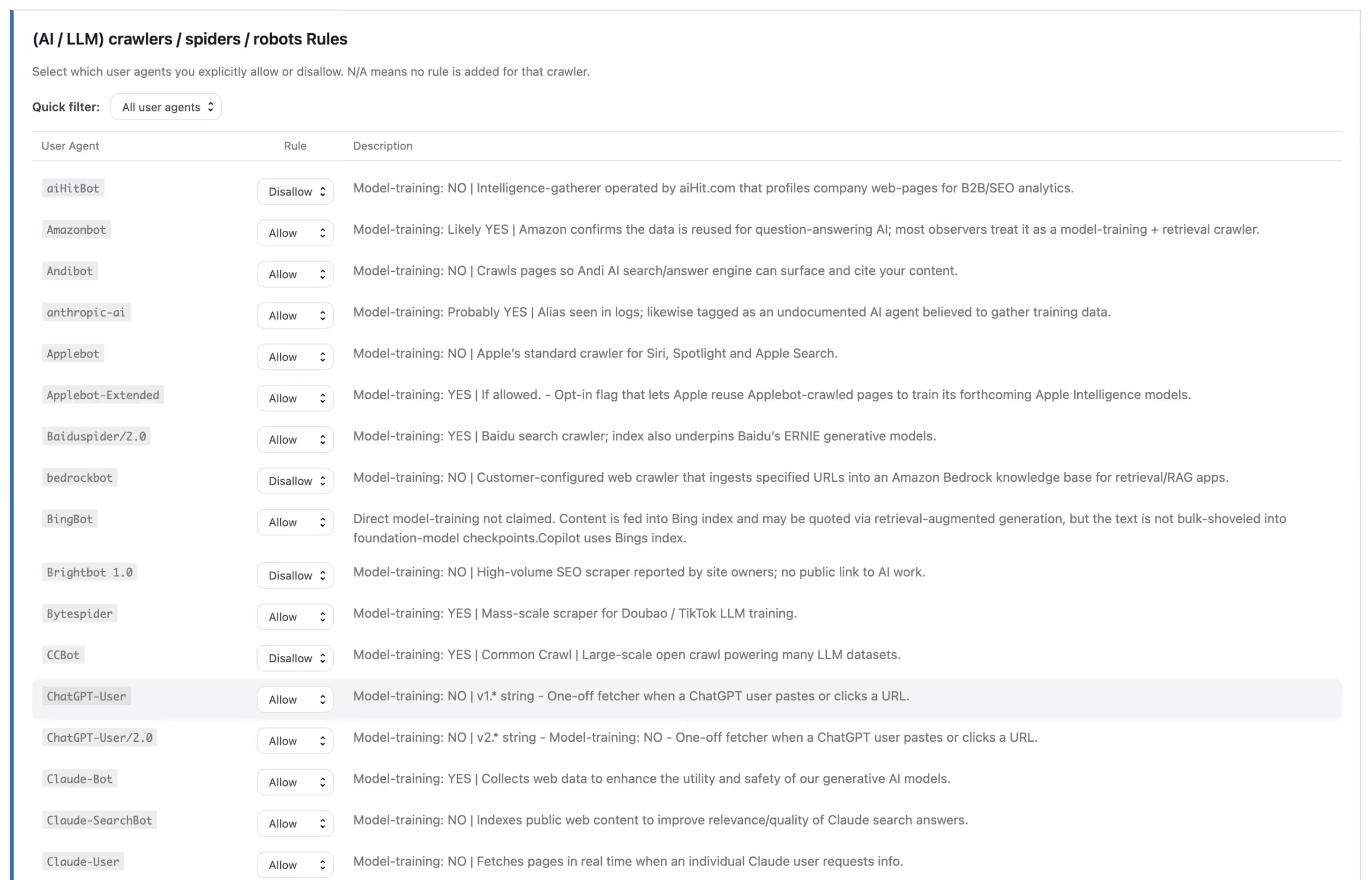
AEO – Robots.txt Server provides an alphabetically organized list of supported AI, LLM and other relevant crawlers. For each supported crawler, you can select one of three straightforward options:
- Allow – explicitly allow the crawler.
- Disallow – explicitly tell the crawler not to access the website according to the configured rule.
- N/A – do not add an individual rule for that crawler.
You therefore do not need to remember every user-agent string or manually assemble the corresponding robots.txt syntax yourself.
A Dynamic Virtual Robots.txt
One of the principles behind the plugin is that managing crawler instructions should fit naturally into WordPress.
AEO – Robots.txt Server does not need to write a physical robots.txt file to your server. Instead, it integrates with the virtual file that WordPress can dynamically provide.
When /robots.txt is requested, your crawler choices and configured rules are used to build the resulting output.
This also makes it easier to adjust your configuration later. Rather than finding and editing a server-side file, you can return to the WordPress administration area, change the appropriate settings and save them.
As always with robots.txt, I recommend checking the actual public /robots.txt URL after making changes. Hosting configurations can differ, and an existing physical robots.txt file may take precedence over WordPress’ virtual output.
The Free Lite Edition Is Actually Useful
I want the Lite editions of my plugins to provide something genuinely useful rather than merely functioning as demonstrations of the Pro versions.
That applies to AEO – Robots.txt Server as well.
AEO – Robots.txt Server Lite is free and already provides the core functionality needed to start managing supported AI and LLM crawlers from WordPress.
Among other things, Lite provides:
- A dynamic virtual
robots.txt. - An alphabetically organized list of supported AI and LLM crawlers.
- Individual Allow, Disallow and N/A choices.
- Built-in baseline rules.
- Built-in fixed blocking rules.
- Content Signal Guidelines support.
- A direct settings link from the WordPress Plugins screen.
- Reset functionality for returning settings to their defaults.
So if your main objective is simply to gain more control over how individual AI and LLM crawlers are addressed, you can start with Lite without paying anything.
When You Want More Control, There Is Pro
There is also a point where managing individual crawlers is only one part of the larger picture.
Websites with more complex WordPress installations, media libraries, multilingual structures or specific crawler requirements may want much finer control over the complete robots.txt configuration.
That is where AEO – Robots.txt Server Pro comes in.
Pro expands the core crawler management functionality with additional tools for building and maintaining a broader crawler policy directly from WordPress.
Custom Allow and Disallow Rules
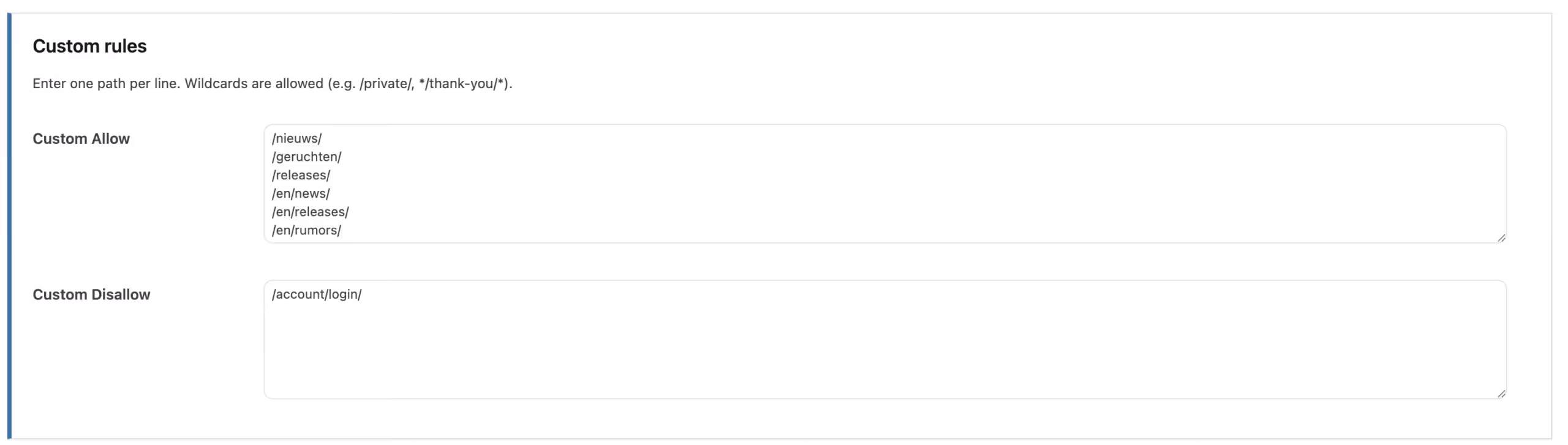
Sometimes predefined crawler choices are not enough. You may want to allow or block particular paths within your own website.
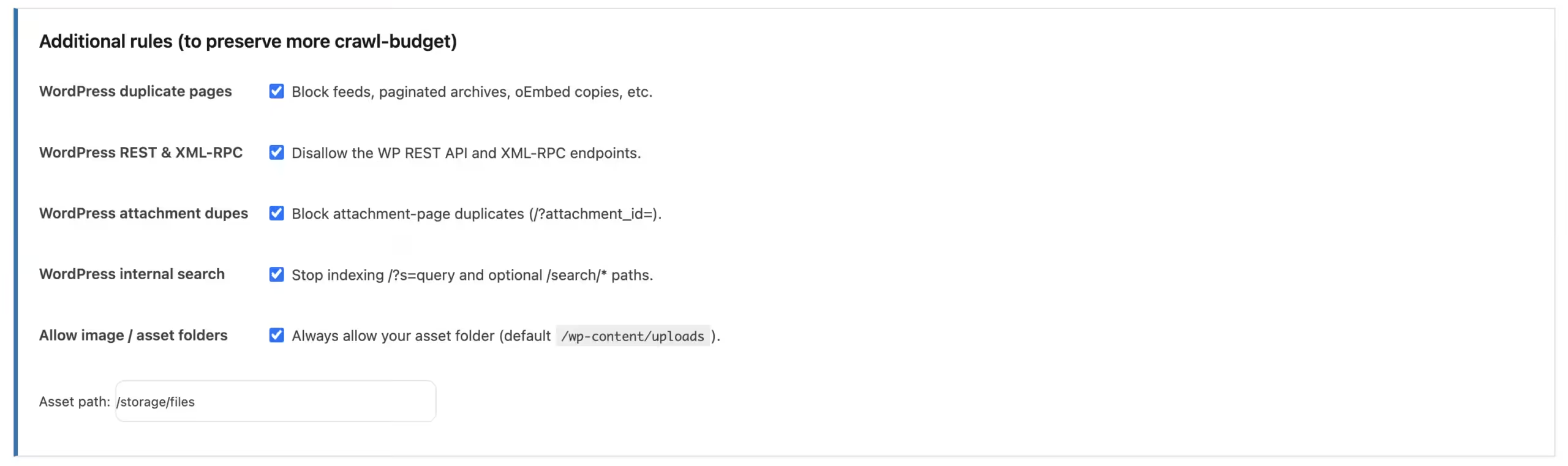
Pro lets you configure additional Allow and Disallow rules so that your robots.txt can better reflect the actual structure and requirements of your WordPress installation.
More Control Over Crawl Behaviour
Pro also adds options intended for more advanced crawler management, including controls relating to crawl behaviour and crawl-budget considerations.
This can be particularly useful on larger websites where not every technical, administrative or dynamically generated path needs the same crawler attention.
Content, Assets and Media
WordPress websites often contain considerably more than ordinary posts and pages. Images, generated files, PDFs and other assets can also form part of the crawlable website.
The Pro edition provides additional controls for content and media paths, including options related to Googlebot-Image, assets and PDF indexing rules.
This gives administrators more flexibility when deciding not just which crawler receives instructions, but also which parts of the website those instructions concern.
Crawl-delay and Additional Rules
For situations where you need them, Pro also offers functionality such as Crawl-delay configuration and additional custom rules.
Not every crawler necessarily supports every robots directive, of course, so these settings should always be used with an understanding of how the crawler in question interprets them.
Sitemap Management from the Same Configuration
Your robots.txt can also provide crawlers with information about available XML sitemaps.
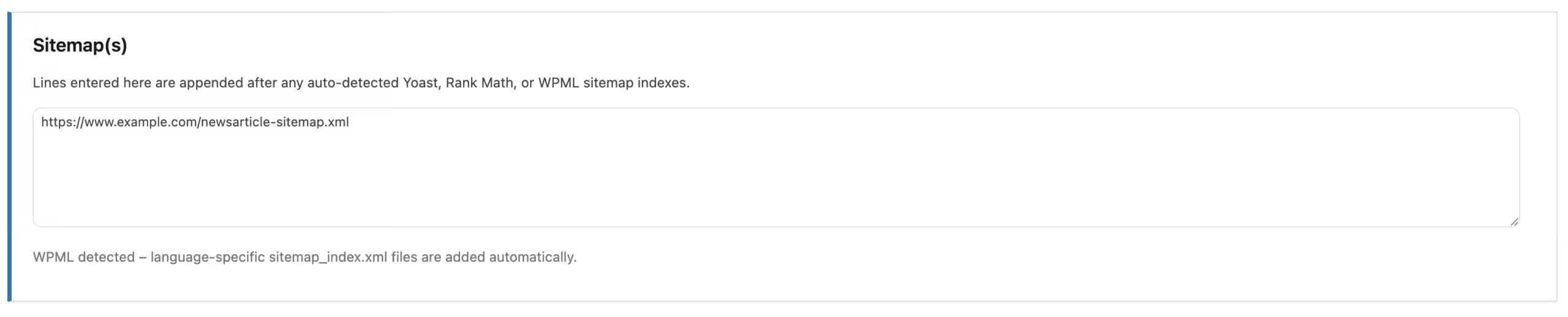
AEO – Robots.txt Server Pro therefore includes sitemap management functionality rather than forcing you to manage this separately. The plugin can work with supported Yoast SEO and Rank Math sitemap structures and can recognize WPML when multilingual sitemap structures are involved. Additional sitemap URLs can also be configured when needed.
For websites that already rely on these WordPress tools, this helps keep the resulting crawler configuration aligned with the rest of the site.
Useful When Managing Multiple WordPress Websites
Repeating the same configuration across multiple websites is rarely an enjoyable job. For administrators and developers who manage more than one WordPress installation, AEO – Robots.txt Server Pro therefore also includes JSON import and export functionality.
You can export a compatible configuration and import it elsewhere instead of rebuilding an extensive collection of settings manually each time.
It is a relatively small feature until you have several websites to configure. Then it can save quite a bit of repetitive work.

Lite or Pro?
I have deliberately tried to make the distinction straightforward.
Start with AEO – Robots.txt Server Lite if you mainly want an easy way to manage individual AI and LLM crawlers.
You get the core crawler controls and a dynamically generated virtual robots.txt without having to purchase anything.
Consider AEO – Robots.txt Server Pro if you want to treat robots.txt as a more complete part of your crawler-management strategy.
Pro becomes particularly useful when you want custom rules, additional crawl controls, media and asset handling, sitemap management, PDF-related configuration or import/export functionality. There is no need to start with Pro simply because it exists. Try Lite, see whether it covers what you need and move to Pro if the additional control becomes useful for your website.
Robots.txt Is an Instruction, Not an Access-Control System
There is also an important distinction worth making when discussing robots.txt. A robots file communicates instructions to crawlers. It is not a firewall, authentication mechanism or technical access restriction.
Well-behaved crawlers may respect the rules you publish, but a malicious or non-compliant bot can ignore them. Sensitive information should therefore never be protected solely through robots.txt.
AEO – Robots.txt Server is intended to make crawler instructions easier to manage; it does not turn those instructions into a security boundary.
Part of a Broader Approach to AI-Friendly WordPress Content
AEO – Robots.txt Server is also part of a broader collection of plugins I am developing around the changing relationship between WordPress websites and automated systems.
Rather than building one enormous plugin that attempts to handle everything, I prefer separating clearly different responsibilities.
AEO – LLMs Server
AEO – LLMs Server focuses on content discovery.
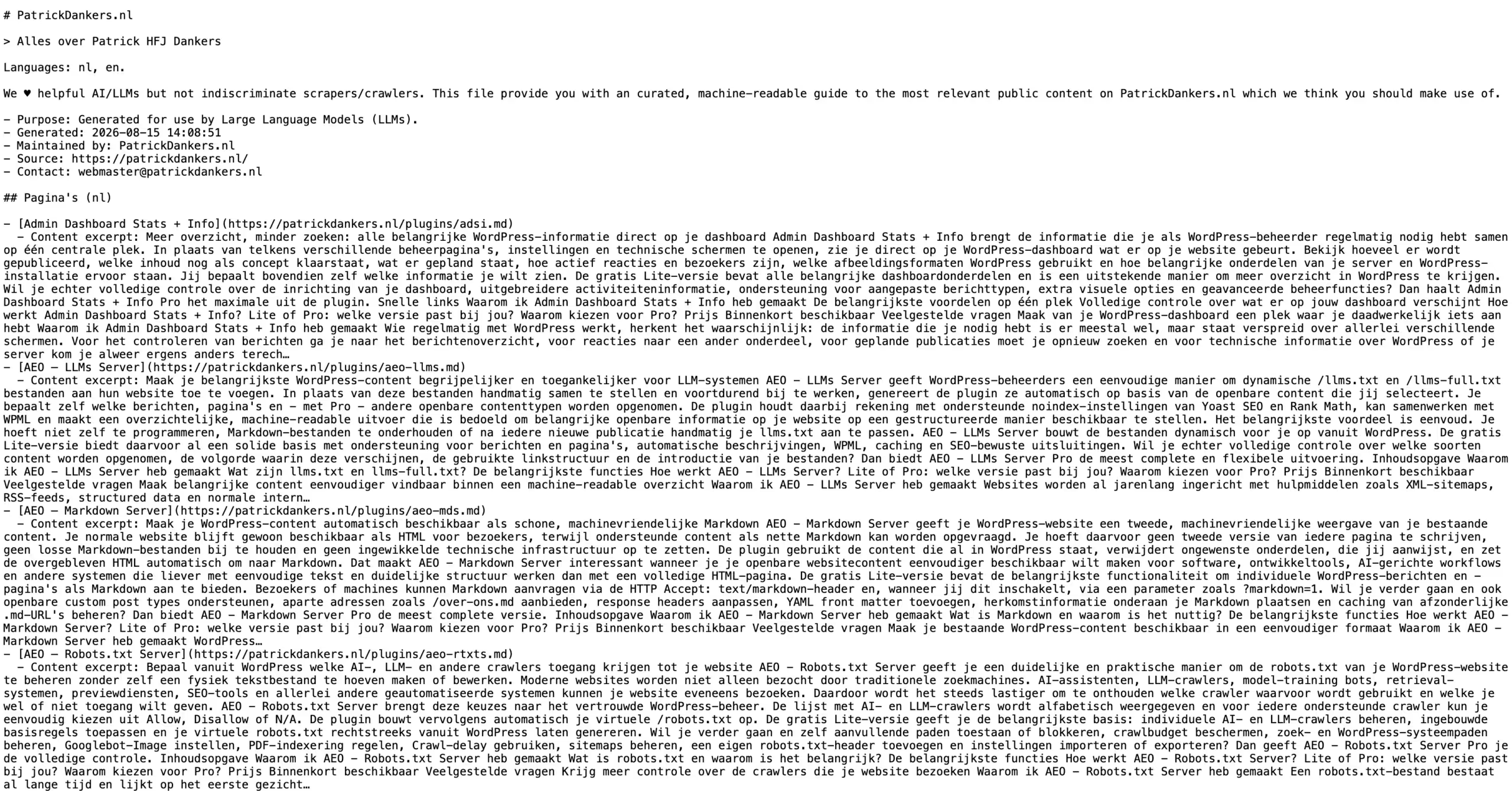
It dynamically generates /llms.txt and /llms-full.txt files from selected WordPress content, providing machine-readable overviews of important public information without requiring you to maintain those files manually.
In simplified terms, AEO – LLMs Server helps answer the question: which important content should I make easier for LLM-oriented systems to discover?
AEO – Markdown Server
AEO – Markdown Server approaches the problem from another direction: representation.
It can make supported WordPress content available as clean, machine-friendly Markdown alongside the normal HTML pages intended for visitors.
That means you can continue maintaining your content normally in WordPress while providing an alternative format that can be easier for software and AI-oriented workflows to process.
And AEO – Robots.txt Server Handles the Crawler Instructions
AEO – Robots.txt Server completes another piece of that puzzle by focusing on crawler instructions.
Put simply:
- AEO – LLMs Server helps with content discovery.
- AEO – Markdown Server helps with machine-friendly content representation.
- AEO – Robots.txt Server helps with crawler instructions and access preferences.
They are related, but none of them requires the others. You can use only the functionality that makes sense for your own website.
No Need to Overcomplicate It
AI, LLMs, crawlers, machine-readable formats and new web standards can make website administration sound much more complicated than it needs to be.
My goal with these plugins is almost the opposite.
Your content is already in WordPress. Your website configuration is already in WordPress. Where possible, managing how automated systems interact with that website should fit into the same environment rather than creating yet another collection of manually maintained files and disconnected tools.
AEO – Robots.txt Server takes that approach to robots.txt.
If all you need is straightforward control over supported AI and LLM crawlers, start with the free Lite edition. If your requirements grow and you want much finer control over your complete crawler configuration, Pro is there for that.
You can find out more about AEO – Robots.txt Server at https://patrickdankers.nl/en/plugins/aeo-rtxts/.
And There Is More on the Way
AEO – Robots.txt Server, AEO – LLMs Server and AEO – Markdown Server are not the end of what I am working on. I have several more WordPress ideas and tools in development, including further ways to make everyday WordPress administration and the interaction between websites, crawlers and emerging AI-oriented technologies more manageable.
So consider these plugins the beginning rather than the finished set of tools.
There is more to come soon on the plugin front, just let me cook 😉